
What Is Context Engineering? A Practical Guide for Everyday AI Users
A prompt is what you type. Context is everything the AI already has when you type it. Here's how to get it right in ChatGPT, Claude and Gemini, with examples you can copy today.

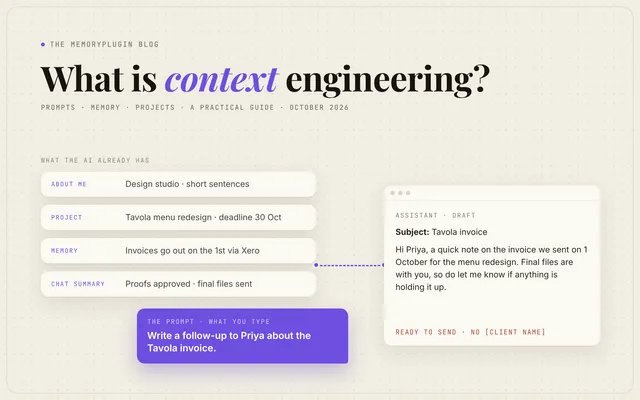
Context engineering is deciding what your AI already knows before it answers. That covers who you are, what you're working on, your preferences, the right files and the conversation so far. A prompt is what you type. Context is everything the AI has when you type it. Get the context right, and short prompts start working.
Clever phrasing matters less than it used to. What usually separates a generic answer from a useful one is context. If you use ChatGPT, Claude or Gemini every day, you already do some context engineering. This beginner's guide is about doing it on purpose.
What is context engineering, in simple words?
When you brief a new colleague, you don't forward your whole inbox. You tell them who the client is, what's been decided and what you need by Friday. Context engineering is that briefing, done for an AI.
The term was popularized in June 2025. Shopify CEO Tobi Lütke wrote that he preferred "context engineering" over prompt engineering because "it describes the core skill better: the art of providing all the context for the task to be plausibly solvable by the LLM."
Six days later, Andrej Karpathy gave it a +1. He called it "the delicate art and science of filling the context window with just the right information for the next step." The context window is everything the model can see at once. He also warned about overdoing it: "Too much or too irrelevant and the LLM costs might go up and performance might come down."
Plenty of people call it a rebrand, and the ideas aren't new. Still, the name points at the part that decides the result.
The parts of context
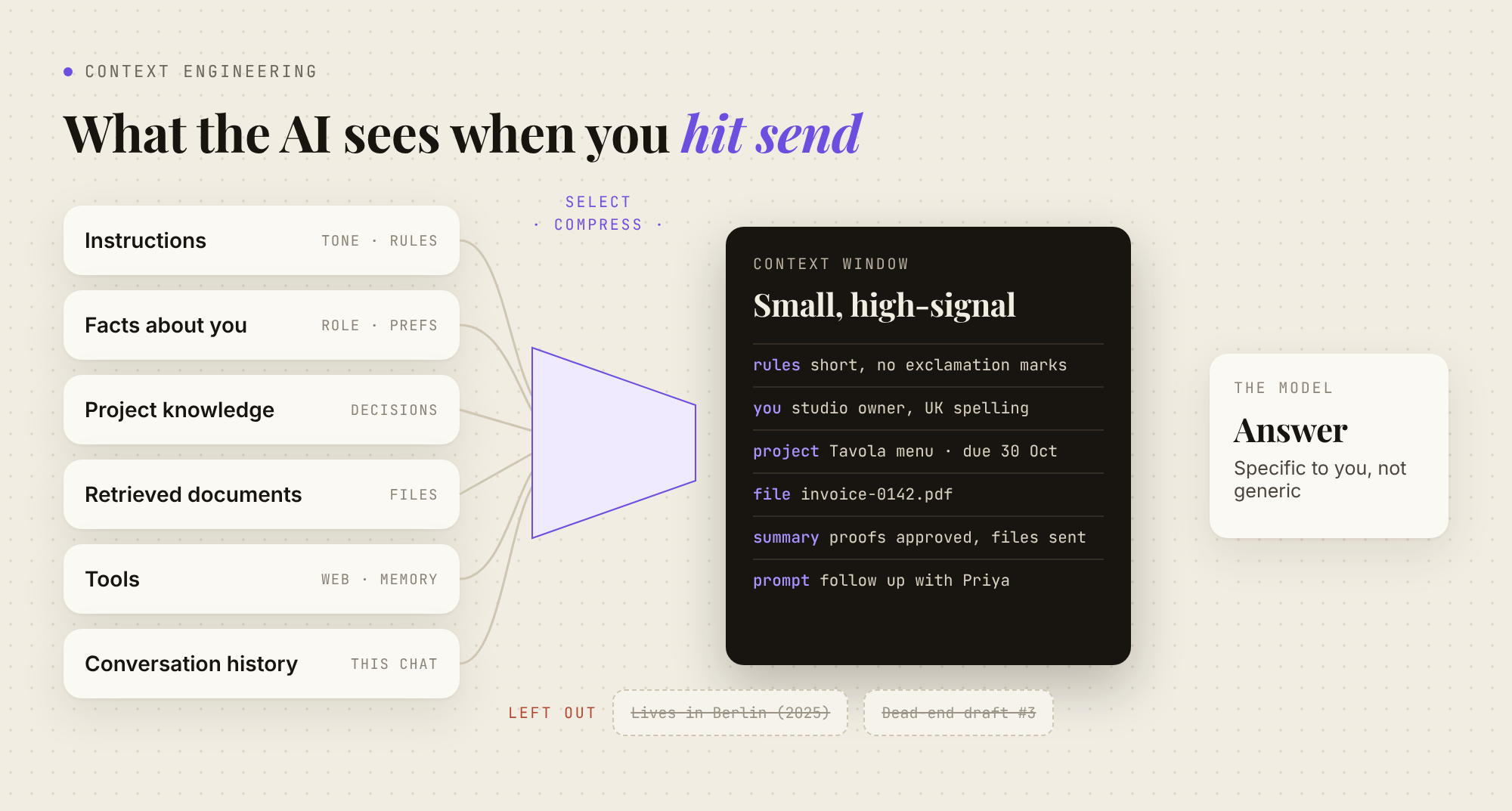
With every message, the model reads all of this at once:
- Instructions: standing rules about tone and format.
- Facts about you: role, audience, preferences.
- Project knowledge: the client, the goal, decisions made.
- Retrieved documents: files or search results for this task.
- Tools: web search and other ways to fetch more.
- Conversation history: everything said so far in this chat.
How is context engineering different from prompt engineering?
A prompt is what you ask right now. Context is everything the AI has when you ask it.
| Prompt engineering | Context engineering |
|---|---|
| Rewording "write a client email" five ways | Telling the AI once who your clients are and how you write |
| Pasting your brand guide into every chat | Keeping the brand guide in a project the AI always reads |
Anthropic calls context engineering "the natural progression of prompt engineering". Wording still matters, but it's only one part of the picture. (More in how to get better advice from AI.)
The four moves, translated for everyday use
LangChain groups context engineering into four strategies: write, select, compress and isolate. They were written for agent builders, but they map onto everyday habits.
- Write (save it). Put lasting facts in instructions or memory instead of retyping them.
- Select (give only what matters). Attach the one relevant file, not the whole folder.
- Compress (summarize). When a chat gets long, ask for a summary and start fresh with it.
- Isolate (keep things apart). Use one project per client or topic, so contexts don't bleed into each other.
Context engineering tips that work in any AI tool
Write a short "about me" brief once
Keep it under 200 words. Cover your role, your audience, your tone, and rules like "never invent figures; ask me." OpenAI advises using custom instructions "for stable preferences (role, tone, formats), and use the chat prompt itself for the specific task at hand."
Use one project per ongoing piece of work
ChatGPT, Claude and Gemini all let you group files and instructions. Put the brief, key documents and house rules there once.
Save the right things
Save your role, recurring projects, standing preferences and decisions. Don't save one-off details, passwords or anything that changes weekly. OpenAI's version: "Avoid saving one-off details that won't matter later." For sensitive one-offs, use a temporary chat.
Write one fact per line, and use real dates rather than "recently."
(Example) A clean memory list:
- I run a two-person design studio, Fern & Field. Clients are mostly local restaurants.
- Writing style: short sentences, no exclamation marks, British spelling.
- Since March 2026, invoices go out on the 1st via Xero.
- Current project (Oct 2026): menu redesign for Tavola. Contact: Priya. Deadline 30 Oct.
- I'm vegetarian. Don't suggest meat dishes in recipe ideas.
Keep it fresh
Once a month, skim what your AI remembers. Fix what changed ("I moved," "that project ended") and delete what's done. A stale fact is worse than none, because the AI acts on it confidently. Here's how to edit memories in each app.
Give less, but better
More context isn't always better. Anthropic describes "context rot": "as the number of tokens in the context window increases, the model's ability to accurately recall information from that context decreases." Chroma tested 18 models and found the same pattern. Anthropic's goal is "the smallest possible set of high-signal tokens."
Summarize and restart long chats
Long chats wander, and dead ends crowd out what matters. Ask for a handoff and paste it into a fresh chat. (More on what the context window holds.)
(Example) A handoff request:
Summarize this chat as a handoff for a new conversation: goal, decisions made
(with reasons), open questions and next steps. Under 200 words. Skip anything
we ruled out.
See the difference
(Example) Before, with no context: "Write a follow-up email to a client who hasn't paid." You get a cheerful template full of [Client Name] placeholders.
(Example) After, with the memory list above: "Write a follow-up to Priya about the Tavola invoice." The AI already knows the studio, the tone, the invoice date and the project. The draft comes back nearly ready to send. Shorter prompt, better result.
For a bigger worked example, see how I give Claude the right context.
How do ChatGPT, Claude and Gemini handle context?
As of October 17, 2026:
| Account-wide instructions | Per-project context | Memory | |
|---|---|---|---|
| ChatGPT | Custom instructions | Projects with files and project instructions, which "override your global custom instructions." Optional project-only memory | Saved memories and chat history, with a memory summary you can correct |
| Claude | Instructions for Claude | Projects with project knowledge and instructions (Free accounts get up to five projects). Each project has its own memory | Memory from chats, which you can turn off for a single chat. Skills adjust tone and format |
| Gemini | Instructions for Gemini, available to all users | Gems, now being replaced by skills. Google says Gems support ends "starting in November" for personal accounts and in March 2027 for Workspace business accounts | Remembers facts you ask it to, but only for adults on a Google AI plan with a personal account, in the US "for now" |
More detail: how Claude memory works and how Gemini memory works.
Using a coding agent? CLAUDE.md, AGENTS.md and Cursor rules
Coding agents read an instructions file at the start of each session: CLAUDE.md (or AGENTS.md) for Claude Code, AGENTS.md for Codex, and .cursor/rules or AGENTS.md for Cursor. As Cursor's docs put it, "Large language models don't retain memory between completions." Keep these files short; Cursor suggests rules "under 500 lines." See our guides to Claude Code, Codex and Cursor memory.
Why does context engineering break when you use more than one AI?
Each tool keeps its own instructions, projects and memory. Your brief lives in ChatGPT, your client notes in a Claude project, your coding rules in a repo. When a fact changes, you update it everywhere. Miss one, and that tool works from old information.
How MemoryPlugin does it once across your AI tools
This is the gap I built MemoryPlugin to close. It doesn't replace each app's features; it's the shared layer underneath.
- Write once. Your memory lives outside any one app. The AI saves what's worth keeping as you chat, or you highlight something to save it. Tell Claude something, and ChatGPT knows it from your next conversation.
- Keep it fresh in one place. Edit a memory once; every connected tool reads the same account. Memory suggestions flag duplicates, contradictions and stale facts, and you approve each fix.
- Isolate. Buckets keep work, personal and each client apart. The AI only sees the bucket you're in.
- Give less, but better. Smart Memory sends summaries first and pulls full detail only when it's needed.
- Use it where you work. The browser extension works inside ChatGPT, Claude and Gemini. The MCP server connects the same memory to Claude Code, Cursor and other MCP clients, and agent skills teach coding agents to check it before they assume. See supported platforms.
A simple split: repo rules in AGENTS.md, facts about you in MemoryPlugin.
FAQ
Is context engineering only for developers?
No. Custom instructions, a project per client and restarting long chats with a summary are all context engineering.
Is context engineering replacing prompt engineering?
It contains it. Anthropic calls it "the natural progression of prompt engineering." Clear wording still helps; it just isn't the main lever anymore.
How much context should I give an AI?
Enough to make the task "plausibly solvable," in Lütke's words, and no more. Irrelevant context can make answers worse.
What are the best context engineering tools for everyday users?
Start with each app's built-in instructions, projects and memory. If you use more than one AI, a memory layer like MemoryPlugin keeps one context across them.
Set up your context once, and every AI you use starts with it. Every subscription starts with a 7-day free trial. Get started with MemoryPlugin.