
Claude Code Memory, Explained: CLAUDE.md, Auto Memory, and What They Miss
How Claude Code's two memory systems work, where the files live, and what stays stuck on one repo and one machine.

Claude Code remembers more than most people realize, and less than most people need. It ships with two built-in memory systems, and as of early 2026 one of them writes itself. This guide explains how both work, where the files live, and what to reach for when the built-ins run out.
The two built-in memory systems
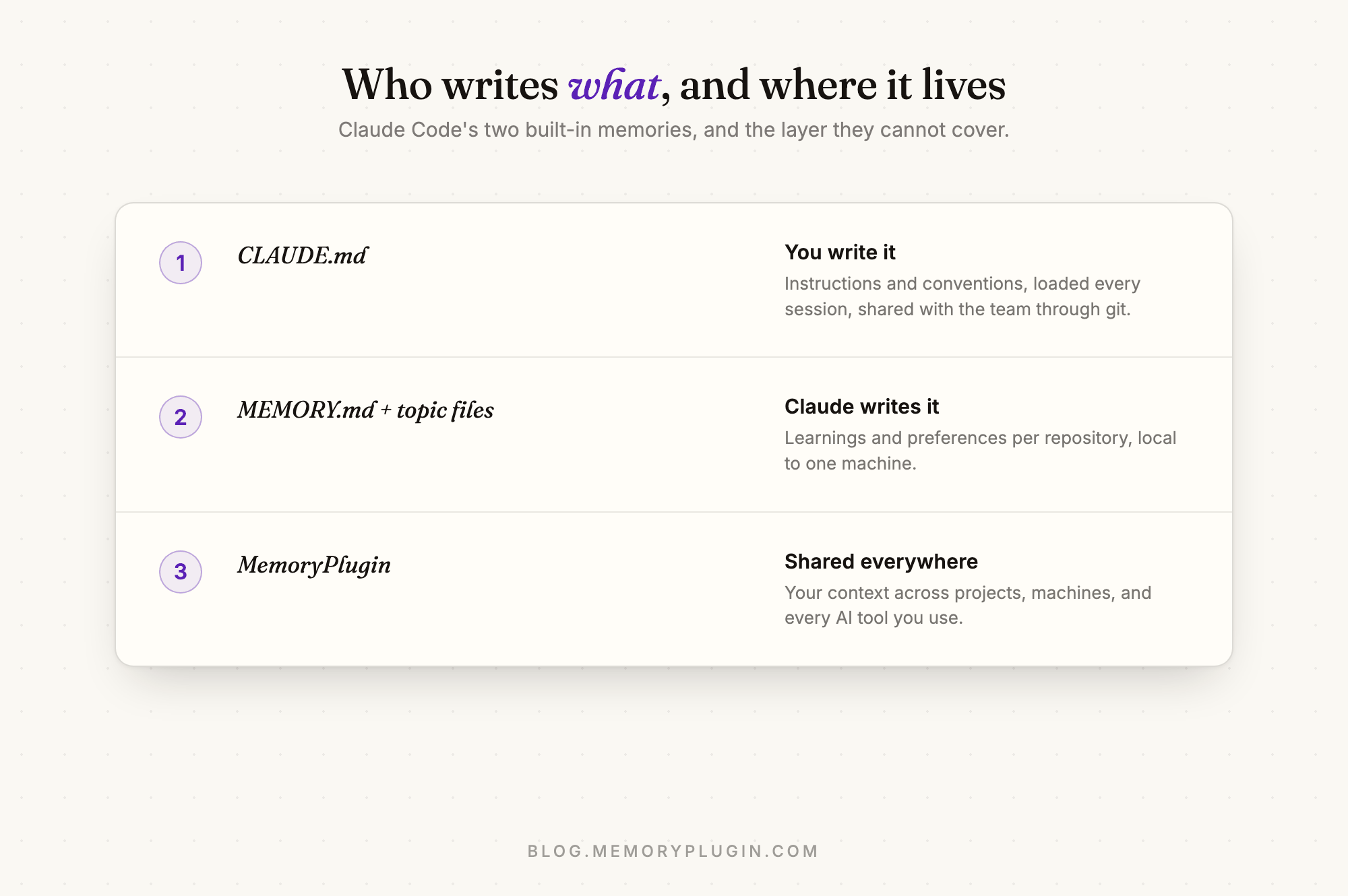
Claude Code carries knowledge across sessions in two ways, both loaded at the start of every conversation:
- CLAUDE.md files: instructions you write yourself. Build commands, coding standards, project architecture, "always do X" rules.
- Auto memory: notes Claude writes for itself as it works. Debugging insights, preferences it learned from your corrections, decisions you made together. Shipped in v2.1.59 in February 2026 and on by default.
How CLAUDE.md works
CLAUDE.md is plain markdown that Claude reads at session start. It can live at several scopes: a project file (./CLAUDE.md or ./.claude/CLAUDE.md, shared with your team through git), a personal file for all projects (~/.claude/CLAUDE.md), a gitignored CLAUDE.local.md for private per-project notes, and a managed org-wide file for company policy. Claude walks up the directory tree and concatenates what it finds.
Two useful details people miss: /init generates a starting CLAUDE.md by analyzing your codebase, and @path imports let one file pull in others (which is also the official way to share instructions with tools that read AGENTS.md: make CLAUDE.md import it).
How auto memory works
Auto memory is Claude taking its own notes. Each git repository gets a memory directory at ~/.claude/projects/<project>/memory/, with a MEMORY.md index plus topic files like debugging.md. The first 200 lines (or 25KB) of MEMORY.md load into every session; topic files are read on demand. When you see "Saved 2 memories" in the interface, this is what is happening.
Everything is plain markdown you can open, edit, or delete. Run /memory to browse it, toggle the feature, or open the folder.
Where the built-ins stop
Both systems share the same boundaries, and they matter as soon as Claude Code is not the only tool you use:
- Machine-local. Auto memory is not synced anywhere. Your desktop's hard-won project notes do not exist on your laptop.
- Project-scoped. Memory belongs to one repository. Facts about you (your stack preferences, your writing style, decisions that span projects) have no natural home.
- Claude Code only. Nothing carries over to Codex, Cursor, ChatGPT, or Claude on the web. Codex keeps its own instructions in AGENTS.md and its own context; every tool is an island.
- Sessions are not searchable knowledge. Past conversations sit in local transcript files. There is no good way to ask "what did we decide about the auth flow in March" from a different tool, or a different machine.
Community plugins like claude-mem tackle part of this by capturing session observations into a local database for Claude Code specifically. That helps continuity inside Claude Code, but the memory still lives on one machine and serves one tool.
Giving your agents one memory across everything
This is the gap MemoryPlugin's agent skills close. One install teaches Claude Code (and Codex, Cursor, Copilot, Gemini CLI, and any agent that supports agent skills) to recall your context at the start of a task and store what matters before finishing, into one memory that lives outside any single tool or machine.
In Claude Code it is a plugin, so setup is two commands:
/plugin marketplace add memoryplugin/agent-skills
/plugin install memoryplugin@memoryplugin
For other agents, npx skills add memoryplugin/agent-skills installs the same skill everywhere it is supported. And the MemoryPlugin Sync desktop app brings your local Claude Code, Codex, and Cursor conversations into searchable chat history, so past sessions are recallable from every AI you use.
| CLAUDE.md + auto memory | With MemoryPlugin | |
|---|---|---|
| Scope | One repository | You, across every project |
| Machines | Local only | Synced, any machine |
| Other tools | Claude Code only | Codex, Cursor, ChatGPT, Claude web, and every AI tool MemoryPlugin supports |
| Past sessions | Local transcripts | Searchable chat history across tools |
The built-ins and MemoryPlugin are complementary, not rivals: keep repo conventions in CLAUDE.md, let auto memory accumulate project learnings, and keep the context that describes you and your work in a memory every tool shares.
Common questions
Does Claude Code have built-in memory? Yes, two kinds: CLAUDE.md instruction files you write, and auto memory notes Claude writes itself (on by default since v2.1.59).
Where does Claude Code store its memory? CLAUDE.md files live in your project and home directory. Auto memory lives at ~/.claude/projects/<project>/memory/, one directory per repository, local to the machine.
How do I give Claude Code memory across machines and tools? Use an external memory layer. MemoryPlugin's agent skill plus MCP server give Claude Code, Codex, and Cursor one shared long-term memory, and the Sync app makes past coding sessions searchable everywhere.
Ready to stop re-explaining yourself to your own tools? Start a free 7-day trial of MemoryPlugin.