
How Claude Remembers You Now
Claude now remembers you on every plan. What each memory layer actually does, where the gaps are, and how to keep your context portable.

For a long time, the standard complaint about Claude was that it woke up with amnesia every morning. You could have a brilliant working session on Tuesday and be a total stranger on Wednesday. That era is over. Claude now has real memory, it is available on every plan including free, and it works differently from what most people assume. Here is what it actually keeps, where the gaps are, and how to stay in control of it.
The short answer
Yes, Claude has memory. On the current experience, Claude builds individual memory entries about you in real time as you chat, organizes them into categories, and carries them into future conversations. You can read every entry, edit it, or delete it. And with a separate feature called chat search, Claude can also go back and retrieve specific past conversations when you ask.
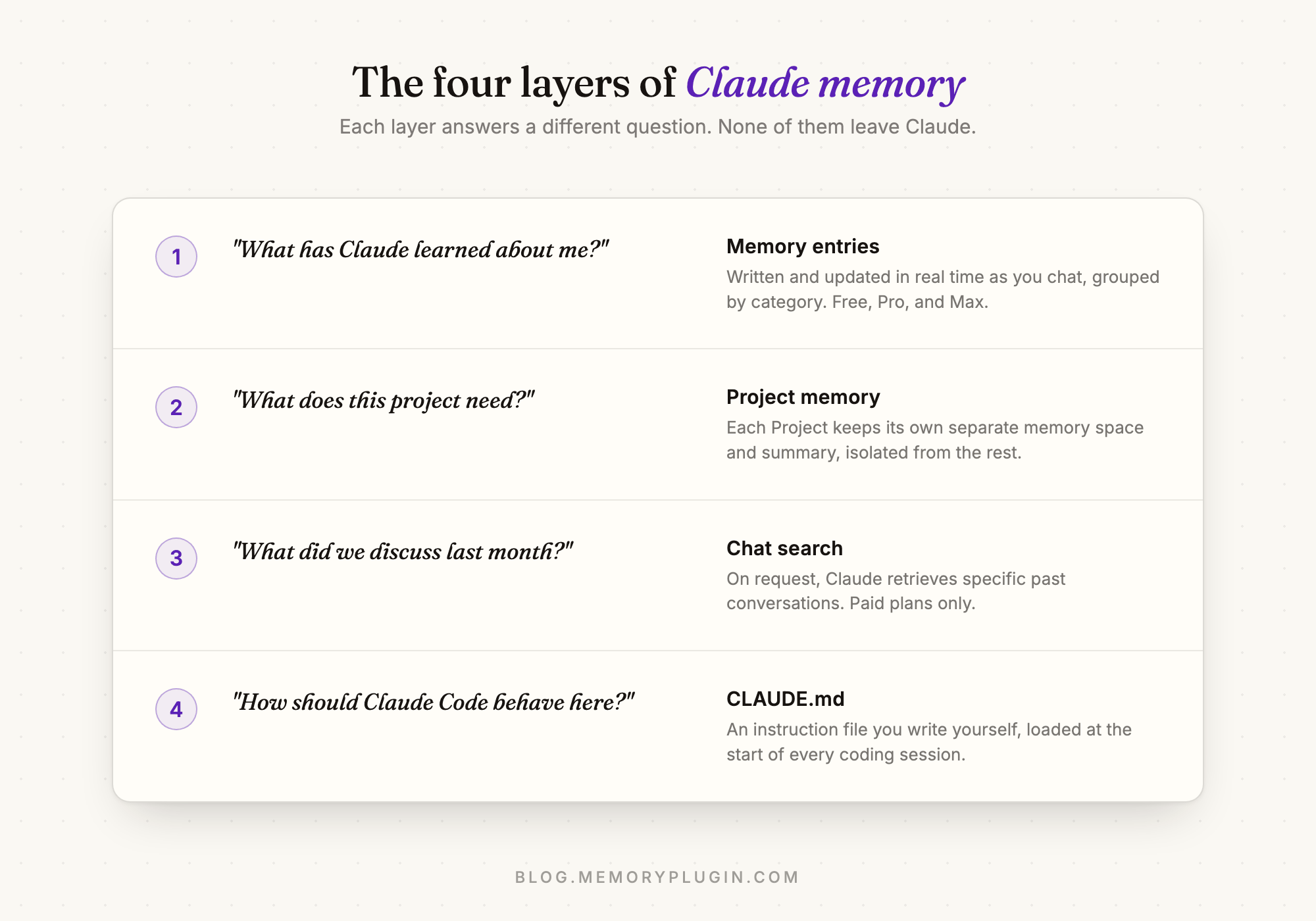
The catch is that "Claude memory" is not one thing. It is four different mechanisms with different scopes, and knowing which one does what saves a lot of confusion.
The four layers
1. Memory entries
This is the core of it. As you chat outside of Projects, Claude writes and updates memory entries about you: your role, what you are working on, how you like answers formatted, technical preferences. Anthropic describes the focus as work-related context that improves collaboration, and that shows in practice. Claude is much more likely to retain "prefers TypeScript with strict mode" than the name of your dog.
Unlike the early rollout, which synthesized a profile on a delay of roughly a day, entries now update live during the conversation. Tell Claude something worth keeping and it can be in memory before you close the tab. This experience is available on the Free, Pro, and Max plans. Team and Enterprise accounts still get the older summary-based version for now, with the new one rolling out gradually.
2. Project memory
Each Project has its own separate memory space with a dedicated project summary. Context you build inside a Project stays there and does not bleed into your global memory or into other Projects. If you keep client work in separate Projects, their memories stay separated too. This is one of the most underrated parts of the design: you get continuity within a workspace without cross-contamination between them.
3. Chat search
Memory is a synthesis. Chat search is retrieval. When you ask something like "what did we decide about the pricing page last month", Claude searches your actual conversation history and pulls in the relevant chats. It only does this when prompted, and it is available on paid plans (Pro, Max, Team, Enterprise). The distinction matters: memory tells Claude who you are, chat search finds what you said.
4. CLAUDE.md, for the coders
Claude Code has its own memory system built on instruction files you author yourself, loaded at the start of every session. It is deliberate, versionable, and completely separate from claude.ai's automatic memory. We covered it in depth in Claude Code memory, explained.
The controls
Claude's memory is unusually transparent, and worth a five-minute tour:
- See everything: Settings > Memory lists every entry, grouped by category. Select one to see its summary and details.
- Edit or remove: use the "Tell Claude what to change or remove" box on any entry, or just tell Claude mid-chat. Edits apply from your next conversation.
- Pause memory: keeps what exists but stops new entries from being written.
- Reset memory: permanently deletes all of it.
- Go incognito: the ghost icon at the top of a new chat starts a conversation that is never saved to history or memory. Available on every plan.
Where it falls short
Three limits are worth knowing before you rely on it.
It is opinionated about what matters. The memory system optimizes for professional context. That is usually the right call, but if you expect it to behave like a diary of everything you have ever said, you will be surprised by what it quietly drops. When something must persist, say so explicitly.
Team and Enterprise lag behind. The real-time entry experience reached individual plans first. Larger accounts still run the legacy summary model until the rollout reaches them.
It stays inside Claude. Anthropic now offers a memory import and export tool at claude.com/import-memory, which is genuinely more than most vendors offer, but the company labels it "experimental and still in active development." And it is a one-time transfer, not a living connection. The profile Claude builds about you does not follow you to Gemini, Perplexity, Cursor, or anywhere else you work.
The portability gap
That last limit is the structural one. Every assistant is now building memory, and every one of them is building it inside its own walls. Claude's memory makes Claude better. ChatGPT's memory makes ChatGPT better. Neither makes you more portable, and the moment you switch tools (or a workplace policy switches them for you), the context you spent months building stays behind.
That is the gap MemoryPlugin exists to close. It is a browser extension that gives you one long-term memory that works inside Claude and travels with you to ChatGPT, Gemini, Perplexity, and every AI tool MemoryPlugin supports. Claude's native memory and a portable layer are not rivals; the native one deepens a single tool, the portable one keeps every tool on the same page. If you are moving between assistants, start with how to switch to Claude without losing your memory.
Frequently asked questions
Does Claude have memory?
Yes. Claude builds memory entries about you in real time as you chat and uses them in future conversations. Each Project also keeps its own separate memory, and chat search can retrieve specific past conversations on paid plans.
Is Claude's memory available on the free plan?
Yes. The current memory experience is available on Free, Pro, and Max plans. Chat search, which retrieves past conversations, requires a paid plan. Team and Enterprise accounts are still on the older summary-based memory while the new experience rolls out.
How do I see and edit what Claude remembers?
Go to Settings > Memory. Every entry is listed by category, and each one can be edited or deleted. You can also just tell Claude what to remember or forget in any chat, pause memory entirely, or reset it to delete everything.
Does Claude share memory between Projects?
No. Each Project has an isolated memory space and its own summary. Global memory covers your non-Project chats only.
Can I move my Claude memory to another AI?
Anthropic offers an experimental import and export tool for one-time transfers. For a memory that stays live across tools, a cross-platform layer like MemoryPlugin keeps one shared memory working in Claude, ChatGPT, Gemini, and every AI tool MemoryPlugin supports.