

Agent skills, explained: the folder format every AI tool now reads
One folder, one markdown file, and suddenly every AI coding tool speaks the same language. What agent skills are, how to write one, and where memory fits in.

In October 2025, Anthropic shipped something almost insultingly simple: a folder with a markdown file in it. The file is called SKILL.md. It tells an AI agent how to do a specific job, in plain English, and the agent reads it only when the job comes up.
Ten months later, that folder format is everywhere. VS Code reads it. So do Cursor, OpenAI's Codex, Gemini CLI, GitHub Copilot, JetBrains Junie, Goose, Kiro, and about forty other tools, all from the same directory, without conversion. Write a skill once and nearly every serious coding agent on the market can use it.
This post covers what skills actually are, why such a boring format won, how to use them in 2026, and where they fit next to the other things competing for your agent's attention: MCP servers, CLAUDE.md files, and memory.
A skill is a folder with a README for your agent
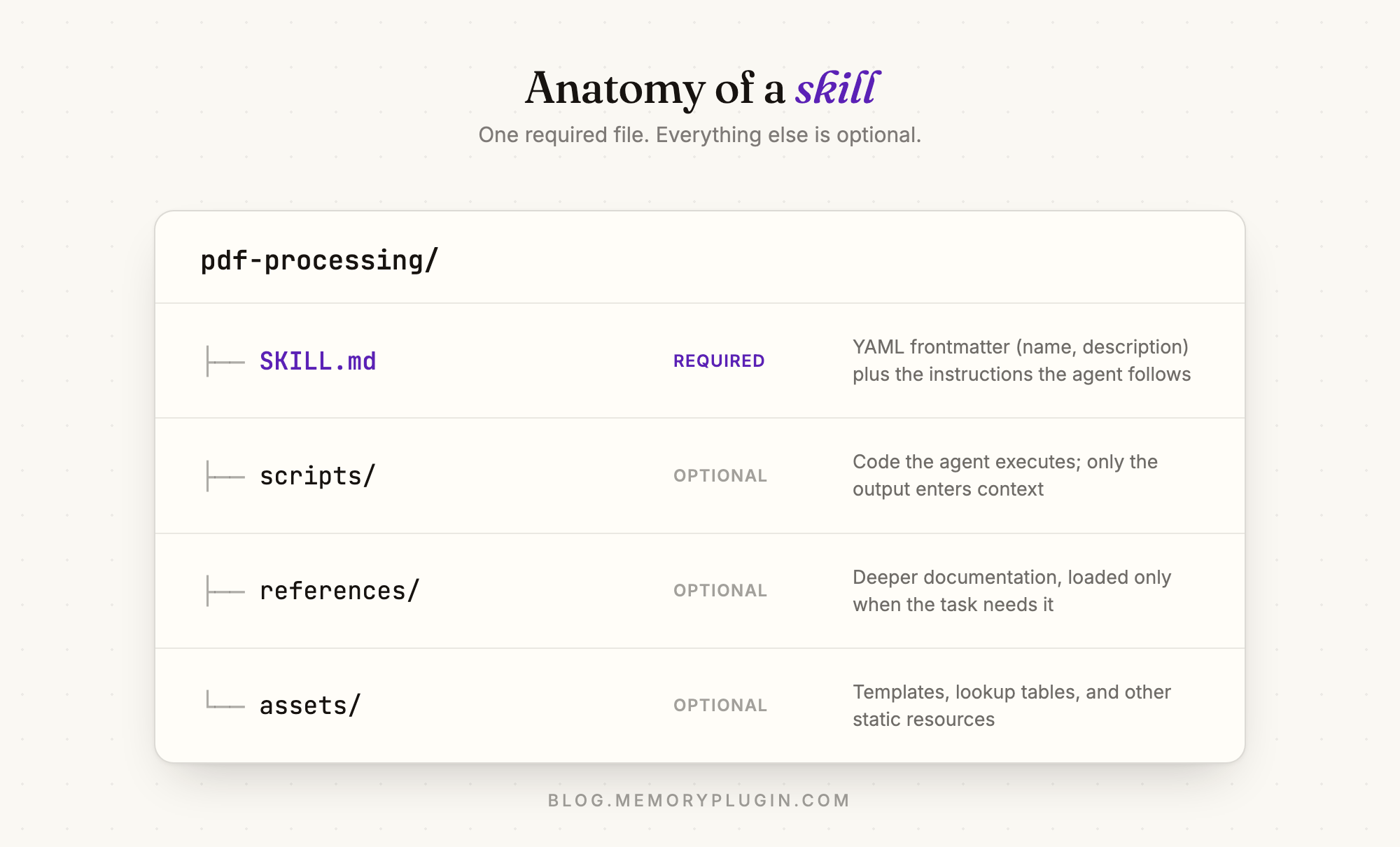
The entire format: a directory containing a SKILL.md file. The file starts with a little YAML block, then instructions in ordinary markdown.
---
name: pdf-processing
description: Extract text and tables from PDF files, fill forms, merge documents. Use when working with PDFs or when the user mentions forms or document extraction.
---

# PDF processing

Use pdfplumber to extract text. For form filling, see references/FORMS.md.
Run scripts/fill_form.py for deterministic form fills.
Two fields are required. name has to be lowercase letters, numbers, and hyphens, 64 characters max, matching the folder name. description gets up to 1,024 characters and does the most important work in the whole file, which we'll get to. Everything else is optional: a scripts/ folder for code the agent can run, references/ for deeper documentation, assets/ for templates. The full specification fits on a single page.
There is no server to run and no schema to negotiate. It's a folder.
Why such a boring format won
The clever part is not the file. It's when the file gets read.
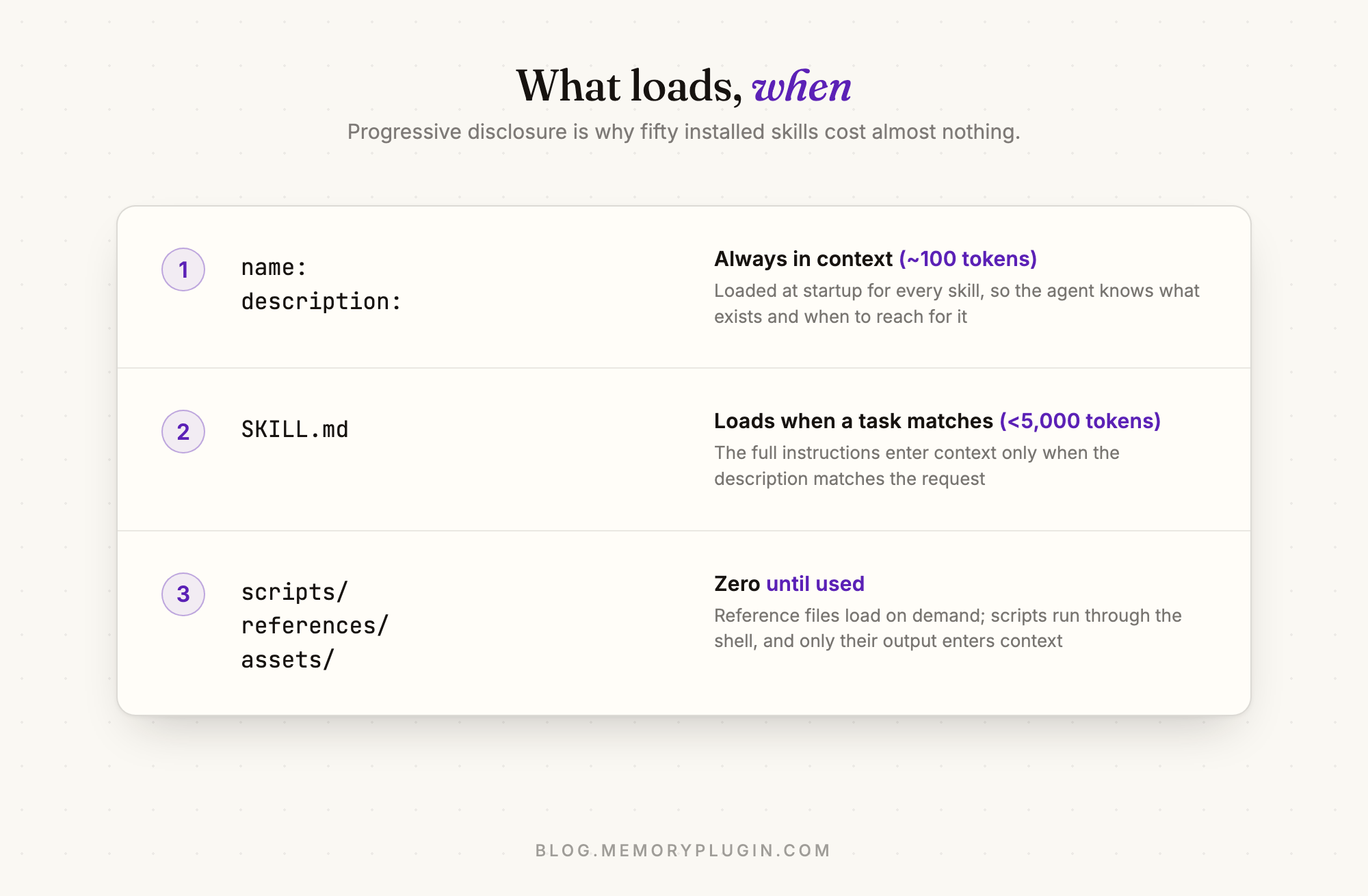
Agents load skills in stages, a pattern the spec calls progressive disclosure:
- At startup, the agent sees only each skill's name and description. That costs roughly 100 tokens per skill. You can install fifty skills and the agent carries a short menu, not fifty manuals.
- When a task matches a description, the agent pulls the full SKILL.md body into context. The spec recommends keeping this under 5,000 tokens.
- Only if needed, it opens the bundled reference files, or runs the bundled scripts. A script's code never enters the context window at all. The agent runs it and sees only the output.
If you've read my post on getting better advice from AI, you know the argument: the model is rarely the bottleneck anymore, the context is. Skills are that argument turned into a file format. The alternative is what we all did through 2024 and 2025: pasting the same instructions into chat, or growing a system prompt until the important sentence drowns in it. A skill costs nothing until the moment it's relevant, then it shows up complete.
The stroke of luck (or design) is that this needed no new infrastructure. Agents could already read files. Anthropic's engineering post is candid that a skill is just an onboarding doc for a very fast new hire, organised so the hire doesn't read the whole binder on day one.
How it went from Claude feature to industry standard
The short version:
- 16 October 2025: Anthropic launches Agent Skills in Claude apps, Claude Code, and the API, alongside pre-built skills for Word, Excel, PowerPoint, and PDF files.
- 18 December 2025: the format is released as an open standard at agentskills.io, with the spec and a validator on GitHub. Microsoft and OpenAI adopted it within days.
- 2026: the showcase now lists 40+ compatible products, including direct competitors of the company that wrote the spec. Vercel runs skills.sh, a community registry that has passed a million skill installs, where
npx skills add owner/repodrops a skill into whichever agent you use.
Standards usually take years and a committee. This one took a winter, mostly because the spec is small enough that saying no would have been more work than saying yes.
How to actually use skills
Where your skills live and how they trigger depends on the surface.
In Claude Code, put a folder in ~/.claude/skills/ to make a skill available in all your projects, or in the repo's .claude/skills/ to share it with everyone who works on that project. Claude triggers it automatically when your request matches the description, or you type /skill-name to invoke it yourself. (Custom slash commands have since been merged into skills; a command file and a skill folder now do the same thing.) Claude Code also extends the standard in useful ways: a disable-model-invocation: true line for skills only you should trigger, like deploys; context: fork to run a skill in its own subagent; and dynamic context injection, where a line like !`git diff HEAD` runs before the model reads the skill, so the instructions arrive with live data already inlined. The Claude Code skills docs cover all of it.
On claude.ai, the pre-built document skills are already active whenever Claude creates files. Custom skills get uploaded as zips under Settings, Capabilities, on paid plans with code execution enabled.
In everything else, check your tool's docs or just try npx skills add owner/repo. Cursor, Copilot, Gemini CLI, Codex, Goose, and the rest each have their own skills directory, but the format inside is identical.
In the API, skills attach to the code execution container, and a /v1/skills endpoint manages custom ones workspace-wide. That's a developer story for another post.
What makes a skill good
Having written and rewritten a pile of these, the failure modes are predictable.
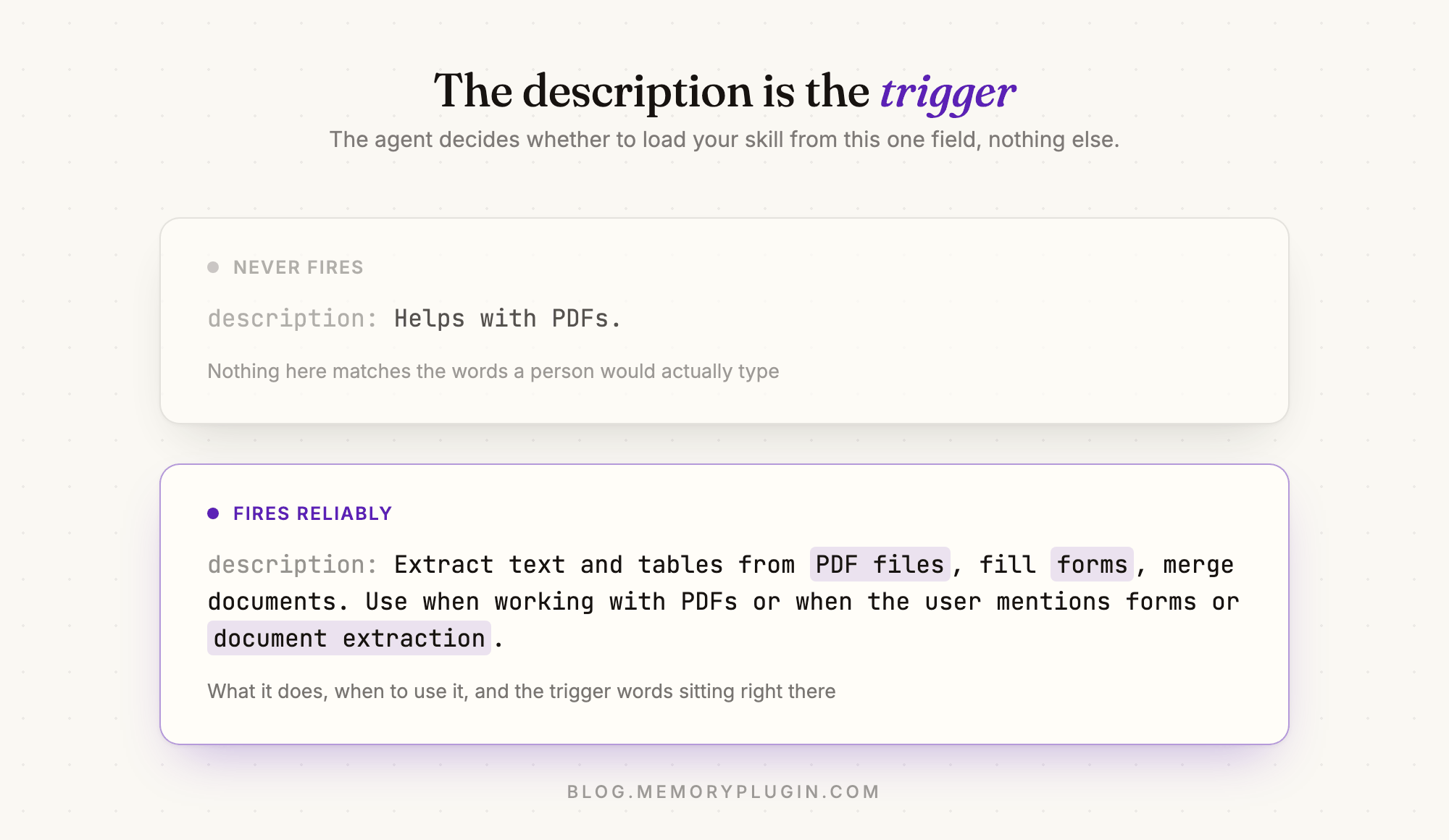
The description is the whole trigger. The agent decides whether to load your skill by reading that one field, nothing else. So it has to say what the skill does and when to use it, in the words a person would actually type. "Helps with PDFs" will never fire. "Extract text and tables from PDF files. Use when working with PDFs or when the user mentions forms or document extraction" fires reliably, because the trigger words are sitting right there.
Short beats complete. The spec says keep SKILL.md under 500 lines, and it's right. Once loaded, every line is a token the agent re-reads for the rest of the session. Move the API reference into references/ and let it load on demand. Put deterministic steps in a script instead of prose; the agent can't misread code it never reads.
Test it like you'd test code. Seeing a skill trigger tells you the agent found it, not that it did what you wanted. Run the same prompts in a fresh session with the skill on and off, and compare. Anthropic ships a skill-creator plugin for Claude Code that automates this loop, including tuning the description against prompts that should and shouldn't trigger it.
Prune. Skills rot the way documentation rots, except an agent actually follows the stale instruction. If a run goes wrong because of a skill, fix the skill before you fix anything else.
I can vouch for the compounding effect because this blog runs on skills. There's one that encodes the whole publishing workflow, metadata rules, art direction, verification steps included, and another for the house illustration style. The first drafts of those skills were me correcting an agent's mistakes; every correction since has gone into the file instead of into a chat message that evaporates. That's the real pitch: instructions you'd otherwise repeat become instructions you wrote down once.
Skills, MCP, memory: which one does what
The 2026 agent stack has a few things that look similar and aren't, and I see people conflate them weekly.
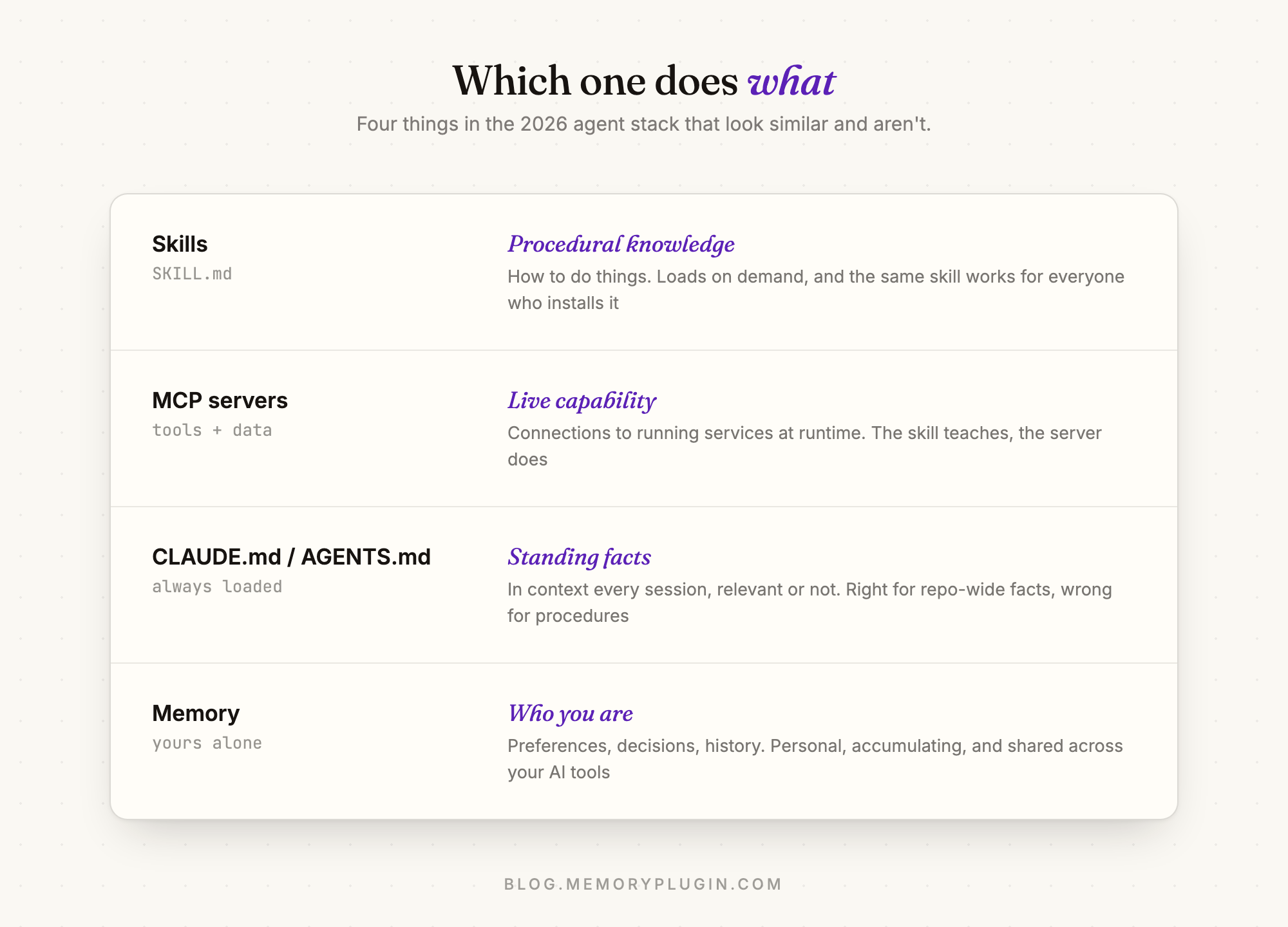
Skills are procedural knowledge. How to review a PR, or how your team writes database migrations. They're general: the same skill works for every user who installs it.
MCP servers are live capability. A skill can't fetch your Linear tickets or query a database; it's a text file. MCP is how an agent connects to running services. I've written before about where MCP fits and where it doesn't; the short version is that skills and MCP compose rather than compete. The skill teaches, the server does.
CLAUDE.md and AGENTS.md are standing facts. Always loaded, every session, whether relevant or not. Right for the handful of things that apply to every task in a repo. Wrong for procedures, which is exactly why skills exist. (More on that split in Claude Code memory, explained.)
Memory is who you are. Your preferences, your decisions, your projects, the things you told an AI in March that matter again in August. A skill is the same for everyone who installs it. Memory is yours alone, and it accumulates.
That last distinction is where MemoryPlugin sits, so full disclosure, here's the horn-tooting paragraph. We ship an agent skill of our own, and it exists because we learned that giving an agent memory tools isn't enough. Connect a memory MCP server to a bare agent and it will happily answer "you know my preferences" from guesswork, or say "let me know if you want me to remember that" and then not remember it. The MemoryPlugin skill fixes the habits: recall before assuming, store before finishing, with the why attached, filed into the right bucket. It installs as a Claude Code plugin, via npx skills add memoryplugin/agent-skills for other agents, or as a zip upload on claude.ai, and it needs the MemoryPlugin account and MCP server underneath it, because the skill is the technique and the memory is the substance. One folder teaches the technique to every agent you use; the memory layer keeps what those agents learn about you consistent across 21+ AI tools.
One caution before you go install forty skills
A skill is software. It carries instructions your agent will follow and possibly scripts your agent will run. A malicious skill can direct an agent to do things that have nothing to do with its stated purpose. Install skills you wrote or skills from sources you'd trust with a shell on your machine, and read third-party ones before enabling them. Claude Code gates project skills behind the workspace trust dialog for exactly this reason.
Common questions
What is a SKILL.md file?
SKILL.md is the required file at the root of an agent skill: YAML frontmatter with a name and description, followed by markdown instructions the agent loads when the skill is relevant. The folder around it can hold scripts, references, and templates. The format is an open standard maintained at agentskills.io.
What is the difference between agent skills and MCP?
Skills are files that teach an agent procedures; they load on demand and can't reach the outside world by themselves. MCP servers are live connections that give an agent tools and data at runtime. They work best together: an MCP server provides the capability, a skill teaches the agent when and how to use it.
Do agent skills only work with Claude?
No. Anthropic created the format, but since December 2025 it's an open standard, and 40+ tools support it, including OpenAI's Codex and ChatGPT, GitHub Copilot, VS Code, Cursor, Gemini CLI, and JetBrains Junie. The same skill folder works across all of them.
How do I create my own agent skill?
Make a folder, add a SKILL.md with a name matching the folder and a description that says what the skill does and when to use it, then write the instructions below the frontmatter. Put it in ~/.claude/skills/ for Claude Code, upload it as a zip on claude.ai, or publish the folder to GitHub so any compatible agent can install it. Keep it under 500 lines and test it against prompts that should and shouldn't trigger it.