
How Gemini Remembers You (and When It Won't)
Gemini can remember your chats, your saved info, and your Google apps. Whether you get any of that depends on your account and your region.

Ask ten Gemini users whether it has memory and you will get both answers, and everyone will be right. Gemini has a real memory system now, arguably one of the more capable ones. It also comes with more conditions than any of its rivals, and whether you get it at all depends on whose account you have and where you live. Here is the whole picture.
The short answer
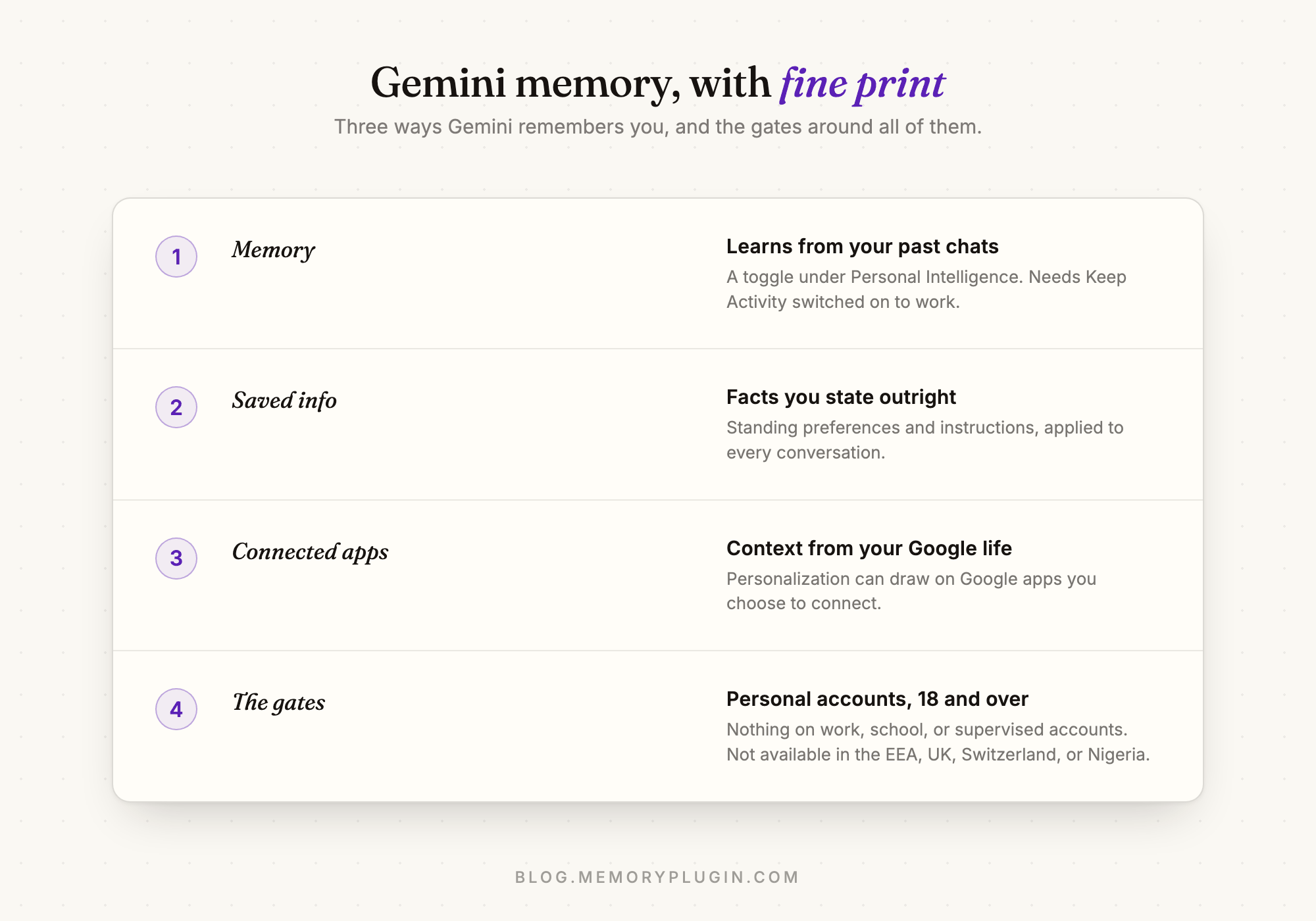
Yes, Gemini has memory, with fine print. The Memory feature lives under Personal Intelligence in settings and lets Gemini learn from your past chats to personalize future answers. Alongside it sit Saved info, where you state facts and standing instructions outright, and connected Google apps, which let personalization draw on your Google life. But all of it is for personal accounts only, requires you to be 18 or over, and is not available in the EEA, the UK, Switzerland, or Nigeria. Sign in with a work, school, or supervised account and Gemini remembers nothing at all.
The pieces, and the gates
1. Memory: learning from your past chats
With the Memory toggle on, Gemini draws on your previous conversations to understand you and shape new answers. You do not curate this layer; it accumulates on its own. Two practical details matter. First, Memory requires Keep Activity to be on, because it works off your stored Gemini Apps Activity. Turn activity storage off and memory goes with it. Second, it does not apply everywhere: Gems and Live conversations sit outside it.
You can audit it in plain language. Ask Gemini "Did you use any info from past chats?" in any conversation, and correct it directly in the chat when it has something wrong. Deleting a chat from your activity removes it from personalization, though Google notes there can be a short delay before it stops being used.
2. Saved info: the explicit layer
Saved info is the deliberate counterpart: facts and standing instructions you state outright ("I am vegetarian", "keep answers concise"), applied across your conversations. Because you write these entries yourself, this is the layer to use for anything you cannot afford to have inferred wrongly.
3. Connected apps
Gemini can also personalize using Google apps you explicitly connect, bringing your wider Google context into answers. Useful, and the most Google-specific part of the design: this layer has no equivalent in ChatGPT or Claude, and it deepens how much of your context lives inside one vendor.
4. The gates
Now the fine print that generates most of the "why doesn't my Gemini remember anything?" confusion. Memory requires a personal Google account and an adult user. It is not available on Google Workspace business accounts, school accounts, or supervised accounts, and the rollout excludes the EEA, the UK, Switzerland, and Nigeria. If Gemini keeps forgetting you at work, nothing is broken. Memory does not exist for your account, full stop.
"Gemini forgets context" is usually a different problem
One distinction worth keeping sharp: memory is about carrying context between conversations. If Gemini loses the thread within a single long chat, that is the context window filling up, and it happens with Memory on or off. We covered that failure mode and its fixes in why Gemini loses context and how to fix it.
What it keeps, Google keeps
Even at its best, Gemini's memory has the same shape as every native memory: it deepens one tool and follows you nowhere. Your Saved info does not exist in ChatGPT. What Memory learned about you cannot come along to Claude or Perplexity. And if you are one of the many people locked out by the gates, on a Workspace account or in an excluded region, you do not even get the single-tool version.
A memory layer in the browser routes around all of it. MemoryPlugin works directly on gemini.google.com regardless of your account type or region: it keeps the durable facts about you and your work, brings the relevant ones into your Gemini chats automatically, and shares that exact same memory with ChatGPT, Claude, and 21+ other AI tools. For Workspace users especially, it is the memory Google will not give you. If you are arriving from another assistant, moving your ChatGPT memory to Gemini is a ten-minute job.
For the rest of the series: how Claude memory works, how Grok memory works, how Perplexity memory works, and why DeepSeek has no memory at all.
Frequently asked questions
Does Gemini have memory?
Yes, on personal Google accounts. The Memory feature under Personal Intelligence learns from your past chats, Saved info holds facts and instructions you state explicitly, and connected Google apps can add further context. It requires being 18 or over and is not available in the EEA, UK, Switzerland, or Nigeria.
Why doesn't my Gemini remember anything?
Most often because of the gates: memory is unavailable on work, school, and supervised accounts, and in the EEA, UK, Switzerland, and Nigeria. It also requires both the Memory toggle and Keep Activity to be on. If none of those apply, check Settings > Personal Intelligence.
Does Gemini remember past conversations?
With Memory on, yes. Gemini learns from your past chats to personalize future answers, though not in Gems or Live conversations. You can ask it directly whether it used information from past chats.
How do I see or delete what Gemini knows about me?
Manage the toggles under Settings > Personal Intelligence, edit or remove Saved info entries there, and delete individual chats from Gemini Apps Activity at myactivity.google.com. Deleted chats stop influencing personalization after a short delay.
How do I get memory on a Google Workspace account?
Gemini's native memory is not available on Workspace business or school accounts. A browser memory layer like MemoryPlugin works on gemini.google.com independently of account type, and shares the same memory with ChatGPT, Claude, and 21+ other AI tools.