

By Alara · Facts checked November 6, 2026
Short answer: ChatGPT forgets earlier messages when a chat's context window fills—older turns lose influence even if you can still scroll up. Ask for a handover summary, paste it into a new chat, put lasting facts in Memory or Custom Instructions, and keep ongoing work in a Project. Turning Memory on does not stop one thread overflowing.
Stop re-pasting the same brief into every new chat. MemoryPlugin keeps the lasting context outside ChatGPT, so a fresh thread can still see it. Try it on ChatGPT →
How do I fix ChatGPT forgetting previous messages?
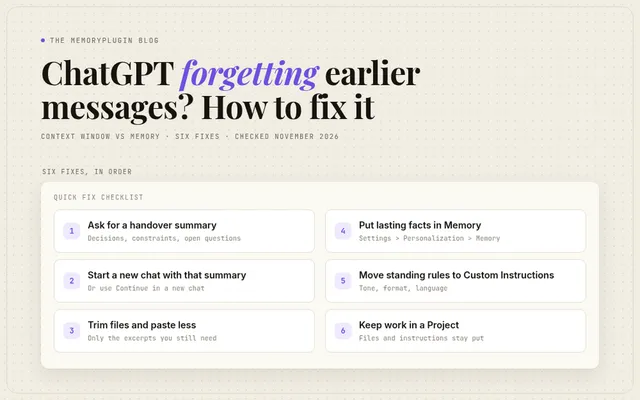
- Ask for a handover summary: goal, decisions, constraints, open questions, next steps.
- Start a new chat and paste that summary first. Or use Continue in a new chat if ChatGPT offers it.
- Re-attach only the files you still need. Long pastes fill the window fast.
- Save standing facts with "Remember that…" or in Settings > Personalization > Memory.
- Move tone, format and language rules into Custom Instructions.
- Put recurring work in a Project so files and project instructions stay put across chats.
Why does ChatGPT forget things in the same chat?
The context window is how much text ChatGPT can work with in one reply. Your messages, its replies, files, tools and instructions all share that space.
That is not the same as Memory. Memory is a separate personalization layer. OpenAI says Memory "does not retain every detail from every conversation," and ChatGPT "decides which available information is relevant to a response" (Memory help). So Memory may know you prefer short replies, while the twelve requirements you agreed on in message four only lived in that chat's window.
Reddit threads keep hitting the same pattern: a long coding or planning chat suddenly acts like a fresh one, even though you can still scroll up and see the earlier turns (example, example). Scrolling is for you. The model only sees what still fits in the active window.
What happens when the ChatGPT context window is full?
The chat may stop accepting messages and offer a new chat with a summary. One user reported this exact banner in forum thread 1411228:
"Context window full: Start a new chat with an automatic summary of this conversation, or upgrade to continue here with more context available in every chat."
In a Support email shared by a user in that thread, OpenAI said it "cannot confirm a technical defect, a recent change to the context limit, or a resolution date," and that Continue in new chat "may carry over information that contributes to the context limit." This is a user-reported in-product path discussed by Support, not a feature documented in the help center.
| What you notice | What's full or missing | Fix |
|---|---|---|
| It contradicts or ignores something from earlier in this chat | This chat's context window | Summary + new chat, or trim what you paste |
| "Context window full" / continue in a new chat | This chat hit its limit | Continue in a new chat; check the summary |
| It forgot a preference across chats | Memory didn't save it, or Memory is off | Ask it to remember, or edit Memory settings |
| A short chat hits the limit early | Early limit reports exist; OpenAI Support has not confirmed a defect (forum) | Start a clean new chat with only what you need; contact support if it repeats |
If your saved memories hit capacity instead, see how to free up memory in ChatGPT. Saved Memory capacity and one chat's context window are different limits.
Example: You spent two days refining a game architecture in one chat. On the next code paste, ChatGPT asks what the project is. The window filled. The scrollback is still there for you; it is no longer fully in view for the model.
How do I continue a long ChatGPT chat in a new one?
- In the long chat, ask: "Summarize this conversation for a fresh chat: the goal, every decision we made, the constraints, open questions and next steps. Keep it under one page."
- Check the summary against the thread. Add names, numbers and decisions it dropped.
- Start a new chat and paste the summary as the first message, with a line such as "Continue from here."
- Re-attach only the files you still need.
- Keep the old chat. It stays in your history if you need the full record.
If ChatGPT offers Continue in a new chat, you can try it, then check whether it created a usable summary. Users in the forum thread reported incomplete or missing summaries. If the new chat reaches its limit too soon, start a clean chat from the sidebar and paste only what you need. These are workarounds, not confirmed fixes for unexpectedly early limits.
For a fuller handover workflow, see how to transfer ChatGPT memory to another chat and how the context window works.
Example: A kitchen-remodel chat hits the limit. The new-chat summary kept the layout but dropped the cabinet measurements, so you paste those in first.
Does ChatGPT Memory stop it forgetting previous messages?
No. Memory helps across chats. The context window governs continuity inside one chat.
When Memory is on, ChatGPT can use saved memories, past chats (if Reference chat history is on), custom instructions, files and connected apps, depending on your plan and region (Memory help). None of that expands how much of the current thread the model can hold at once.
If saved Memory feels full across chats, see how to increase ChatGPT memory—that is a different limit from this chat's window.
Use Memory for facts that should survive a restart: your role, stack preferences, recurring clients. Use the chat for the work in progress. When the work outgrows the window, restart with a summary.
One memory outside the chat window. I make MemoryPlugin. It keeps lasting context outside ChatGPT, so you can start fresh without re-teaching the brief. See MemoryPlugin for ChatGPT →
What should I put in Memory vs Custom Instructions vs a Project?
- Memory: facts about you and your work that should follow you into new chats. Ask ChatGPT to remember something, or edit it under Settings > Personalization > Memory (Memory help).
- Custom Instructions: standing guidance about how it should respond. OpenAI treats these as separate from Memory (Memory help).
- Projects: related chats, files and project instructions in one place. Project instructions apply only inside that project and override global custom instructions (Projects help).
Example: "Use British English and keep replies short" belongs in Custom Instructions. "Acme launch is 12 March, tone warm and direct" belongs in Memory or in an Acme Project. The latest wireframe feedback belongs in today's chat, then in the handover summary when you restart.
How do I stop ChatGPT losing context for good?
Built-in tools help. Stop treating one endless chat as the only place your requirements live. For more on this habit, see context engineering for everyday AI users.
I make MemoryPlugin, so weigh this part with that in mind. MemoryPlugin keeps your memory outside ChatGPT:
- You add, edit and delete memories yourself, and group them into buckets so work and personal stay separate.
- It works inside ChatGPT through the browser extension, and in your other AI tools.
- Sync brings in your Claude Code, Codex and Cursor chats and makes them searchable.
Example: You keep an "Acme" bucket with the launch date, tone and decided stack. A new ChatGPT thread can pull those facts without scrolling a two-day chat.
Every subscription starts with a 7-day free trial. Give ChatGPT memory that survives a new chat →
FAQ
Is ChatGPT forgetting earlier messages a bug?
Usually no. A long chat outgrowing its context window is expected. Early "Context window full" warnings in short chats have been reported to OpenAI Support, which has said it cannot always confirm a defect from those reports alone (forum). If a brand-new chat hits the limit after a handful of messages, contact OpenAI support.
Does deleting a chat free up the context window?
No. Each chat has its own window. Deleting an old chat does not enlarge the current one. Deleting a chat also does not automatically delete a separate saved memory created from that chat (Memory help).
Will a higher ChatGPT plan stop forgetting in long chats?
A higher plan may offer more context, depending on the model and plan; it does not make one chat unlimited. Paid plans can also include more Memory capacity: Plus and Pro got twice as much in the June 4, 2026 release notes. That is separate from the chat window. I could not verify a single published web-chat size for the "Context window full" warning. Restarting with a summary still helps on every plan.
Should I use Temporary Chat when I need it to remember?
No. Temporary chats do not create or update memories. They can use existing memories unless you choose Unpersonalized before the chat starts (Memory help). Use a regular chat or a Project when you want continuity.
Can I keep context across ChatGPT and Claude?
Built-in ChatGPT Memory stays inside ChatGPT. For one memory that follows you into other tools, use an external memory layer such as MemoryPlugin for ChatGPT.