
Does LibreChat Have Memory? How LibreChat's Memory Works in 2026
LibreChat does have memory, but it is not a searchable record of your conversations. Learn what User Memory actually stores, how automatic extraction works, and how MemoryPlugin fills the gaps.

If you run LibreChat without its memory feature configured, every new chat starts without the context from your previous conversations.
The model does not automatically receive yesterday's full conversation when you open a new chat. So the question comes up fast: does LibreChat have memory at all, and if it does, why does it still feel like starting over?
The short answer is yes, LibreChat has memory. But it works differently from ChatGPT's or Claude's, it is not enabled by default, and even when it is enabled, it does not turn your entire chat history into long-term memory.
Here is exactly what it does, what it does not, and how to get more continuity out of it.
Does LibreChat Have Memory?
Yes. LibreChat has a User Memory feature that stores user-specific information and makes it available across conversations. The memory is built around structured key/value entries rather than a complete record of everything you have ever discussed.
Two things make it different from the memory you may know from ChatGPT or Claude.
Off by default
LibreChat is self-hosted, so memory is not a switch in the UI you simply flip on.
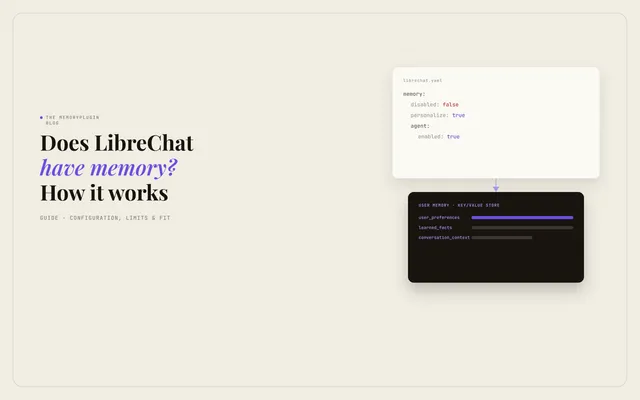
The memory block has to be added to the librechat.yaml file before anyone on your instance can use it. No config, no memory.
Automatic extraction is separately opt-in through memory.agent.enabled: true.
Facts, not conversations
LibreChat memory keeps a structured set of key-value entries, things like user_preferences or learned_facts, and injects them into each request.
It does not index, embed, or search your past chats. User Memory cannot do that.
LibreChat has a separate Message Search feature for finding past conversations. That is a different capability from memory.
How LibreChat's Memory Works Under the Hood
Think of LibreChat memory as a persistent notepad the assistant reads before it answers, not a record of everything you have said.
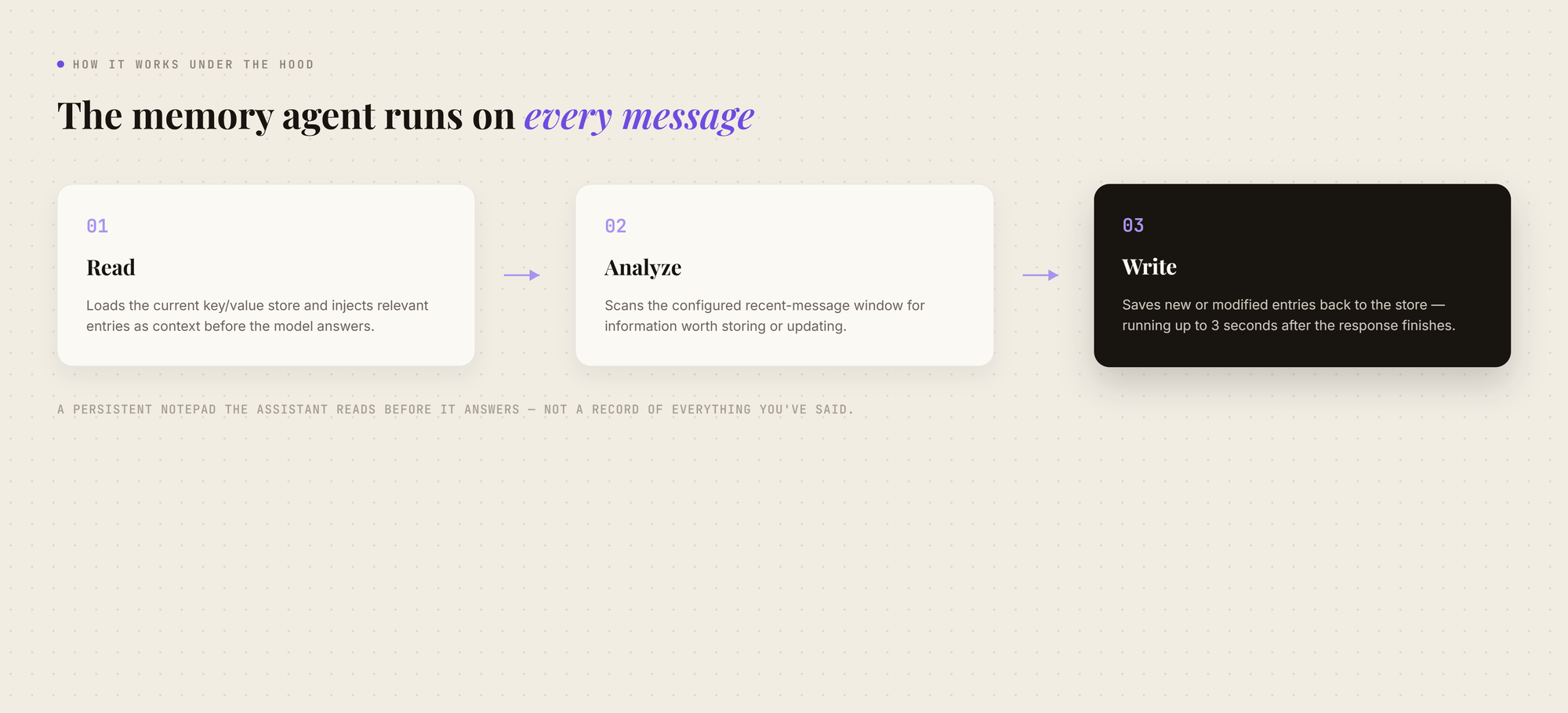
When memory is enabled, a dedicated memory agent looks at your recent messages and pulls out facts worth keeping. It reads the current memory store, analyzes the configured recent-message window for information worth storing or updating, and writes changes back to the store.
The memory agent runs concurrently with the main response and can continue for up to three seconds after the response finishes.
A few details shape how it behaves:
Key-value storage: Information is stored as structured entries, not raw logs. A preference like "keep answers under 200 words" becomes an entry, not a saved transcript.
Valid keys: An administrator can restrict which categories memory is allowed to store using validKeys. Common examples include user_preferences, conversation_context, learned_facts, and personal_information.
Manual control: Users can add, edit, or delete their own memory entries directly in the Memory panel.
Per-chat toggle: When personalization is enabled, users can turn memory on or off for individual conversations.
Agent-scoped memory: Agents use the user's shared personal memory pool by default. An agent can instead use a separate memory partition, so its isolated memories are not shared with the user's other isolated agents or personal memory.
Automatic extraction is opt-in: Setting memory.agent.enabled: true enables automatic extraction. Leaving it disabled means the automatic memory agent does not run on chat requests, although manual memory and Agent memory tools can still be available when configured.
How to Turn On LibreChat Memory
Because LibreChat is self-hosted, enabling memory is a config task, not simply a settings toggle.
At a high level:
- Open your librechat.yaml file.
- Add a memory block and set disabled: false.
- Define your validKeys, the categories memory is allowed to store.
- Set personalize: true if you want users to control memory from the chat interface.
- Set agent.enabled: true if you want automatic fact extraction, and configure its provider and model.
- Set token and character limits if you want to control memory size and processing.
LibreChat's current configuration documentation notes that disabled defaults to false, agent.enabled defaults to false, tokenLimit defaults to no limit, and charLimit defaults to 10,000 characters per memory entry.
Once configured, users can access the Memory panel to review, edit, and delete entries, and use the memory toggle for individual chats when personalization is enabled.
What LibreChat Memory Does Not Do
This is where expectations usually outrun the feature.
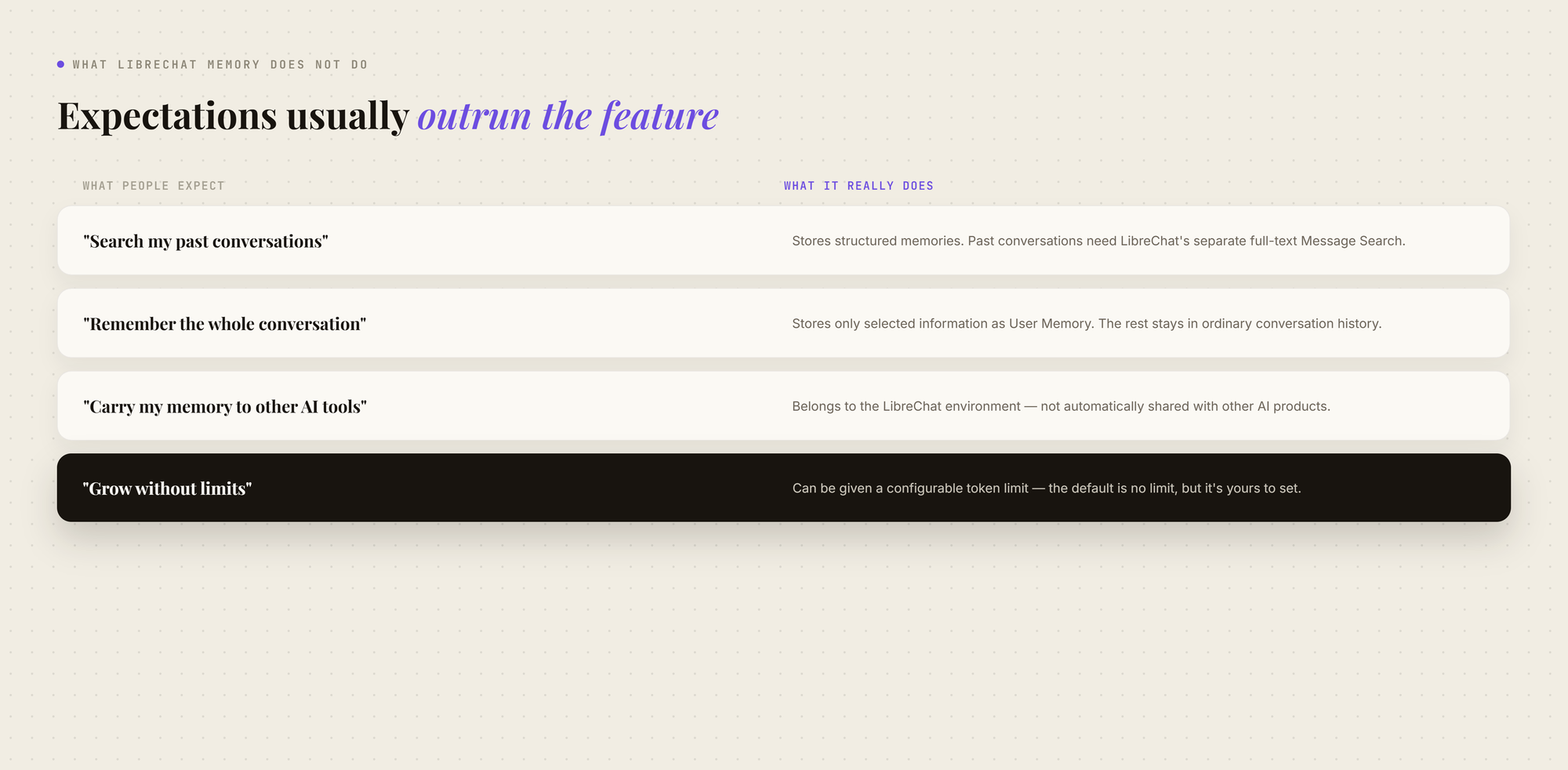
The pattern behind all four is the same: LibreChat's memory is built to keep selected facts and preferences available across conversations inside LibreChat.
It is not a semantic archive of everything you have ever discussed.
Giving LibreChat a Memory That Goes Everywhere You Do
LibreChat's User Memory is useful, but it is deliberately limited.
It stores selected facts and preferences. It does not remember the full conversation, automatically retrieve an old discussion, or give you a richer record of everything you have worked through.
That is where MemoryPlugin adds another layer.
Remember More Than Just Extracted Facts
LibreChat's memory saves selected facts and preferences, but it does not preserve every useful detail from a conversation.
With MemoryPlugin's browser extension, you can select a useful part of a LibreChat conversation and use Extract Memory to save it. You can capture a project decision, recurring instruction, working preference, or other context you want to reuse later.
You can then review, edit, or delete the saved memory.
LibreChat remembers what its memory system identifies.
MemoryPlugin lets you decide what is worth remembering.
Keep Your Important Context Organized
LibreChat stores memory as structured entries.
MemoryPlugin adds buckets, so you can organize reusable context by project, client, work, personal information, or whatever makes sense for you.
For example:
- Work: Your recurring preferences, processes, and work context.
- Projects: Decisions and context specific to a project.
- Personal: Information you want available outside your work context.
This makes it easier to build a memory around how you actually use AI, rather than keeping every saved fact in one place.
Edit What the AI Remembers
Automatic memory is useful until it gets something wrong.
LibreChat lets users edit and delete stored memories, but MemoryPlugin is built around making that memory layer directly manageable too.
You can review what has been saved, correct outdated information, and delete memories that no longer belong there.
That matters because long-term memory is only useful when you can trust what is in it.
Keep Memory Separate From LibreChat
There is another limitation to native memory: it belongs to the LibreChat environment.
MemoryPlugin keeps your saved memories in a separate layer instead.
So LibreChat can keep using its own User Memory while MemoryPlugin holds the context you deliberately want to preserve and reuse.
You do not have to replace LibreChat's memory to add another layer on top of it.
Then Take That Context Beyond LibreChat
Once your useful context lives in a separate memory layer, you are no longer limited to using it only in LibreChat.
MemoryPlugin can make those saved memories available across its supported AI tools.
So the progression is simple:
LibreChat: remembers selected facts inside LibreChat.
MemoryPlugin: gives you more deliberate control over the context you keep.
Across tools: that same saved context can follow you when you move beyond LibreChat.
LibreChat Memory vs. MemoryPlugin
The point is not that LibreChat's memory does not work.
It does.
The limitation is that it was built to remember selected information inside LibreChat, not to give you complete control over the context you want to preserve and reuse.
MemoryPlugin fills that gap first.
Then, once that memory is outside LibreChat, it can follow you into the other AI tools you use.