
How I Switched Claude Accounts Without Losing Everything
I moved from a personal Claude account to a Team workspace and declined the one-way migration. Here is the workflow that made two accounts feel like one.
A guest post from Ayush, a startup founder who recently made this exact move.
A few weeks ago I moved from my personal Claude account to a Team workspace. The invite itself was nothing. The screen after it stopped me cold: Claude offered to move everything from my personal account into the organization. Every chat, every Project, my accumulated memory, all of it, one click. I run my whole working life through Claude, so that click would have carried years of thinking with it. I went and read the fine print first, and I am glad I did.
What I found in the fine print
Anthropic's migration doc is clear about what moves: chats and their artifacts, Projects with instructions and files, uploads, tasks, memory and settings. Custom skills need exporting first, public share links break, and app authorizations get revoked.
Then the line that settled it for me. The move is one-way. In Anthropic's words: "Once content has been moved, it can't be moved back to a personal account."
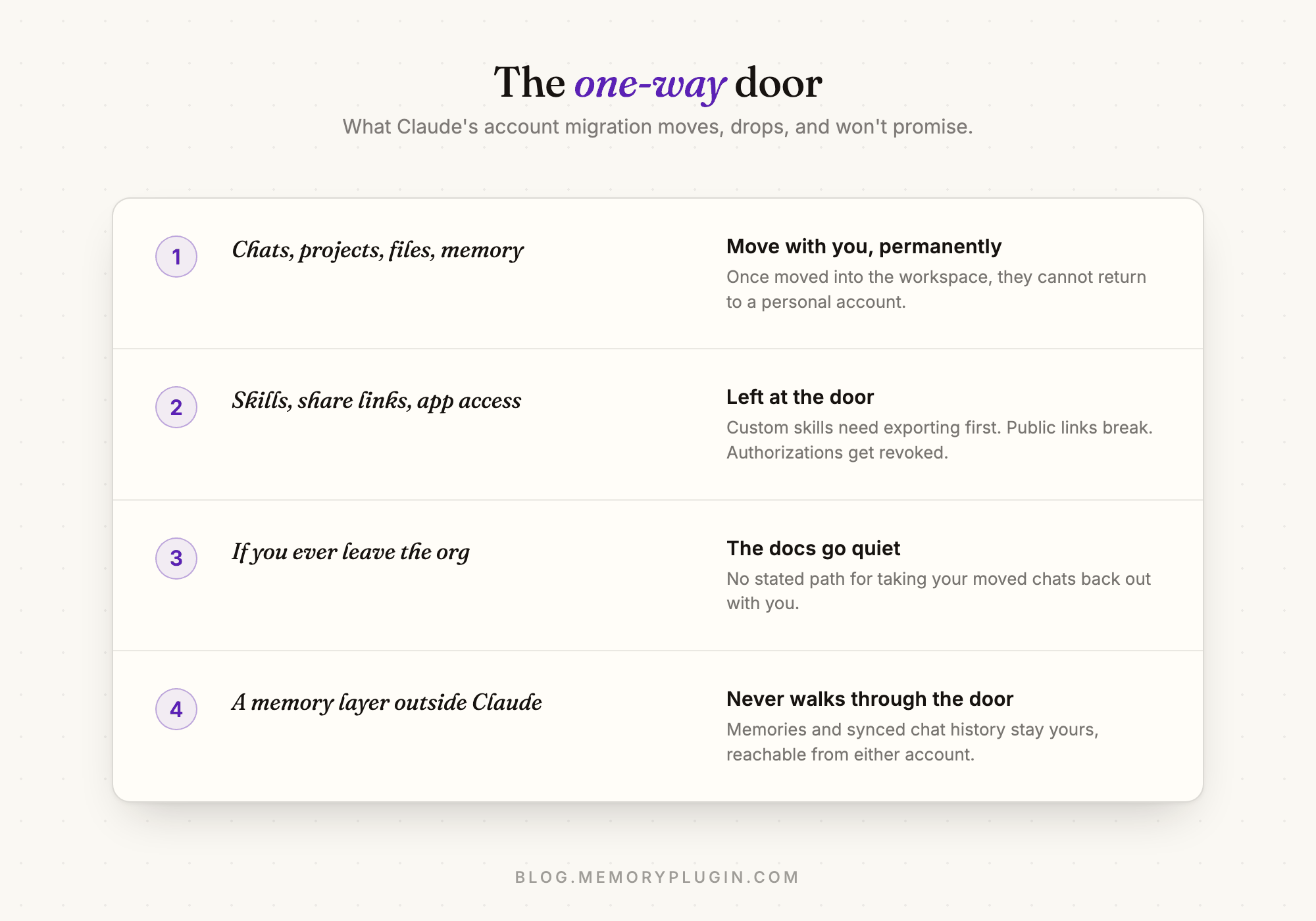
Play that forward. The Team workspace belongs to the company, and the docs say nothing about taking your chats back out if you ever leave. I am a founder today, but companies change, partnerships change, plans change. Signing my personal archive over to any organization, even one I run, felt like the wrong default. So I declined the migration, started fresh in the workspace, and kept my personal account.
Which created the actual problem
Claude treats my two accounts as strangers. Separate chats, separate memory, separate Projects. My personal account knows years of context about how I think and what I have built. My Team account knew nothing. And the things I need day to day are scattered across both: a positioning decision from one account, a half-finished spec from the other. Without some connecting layer, "keep both accounts" just means "lose things in two places instead of one."
Here is the setup that made it work. I was already running MemoryPlugin before the switch, which turned out to be the single luckiest part of this story.
How I actually manage it
One memory, signed into everything
The browser extension keys off me, not my Claude login. The context I have banked over months, what I am building, how I like to work, decisions already made, gets injected into my chats whichever account I am in. The first conversation in the empty Team workspace already knew my company, my stack, and my preferences. It did not feel like a new account. The same memory follows me into ChatGPT and Gemini too, but the two-Claude-accounts case is where it earns its keep daily.
Cmd+Shift+K, my exit from every dead end
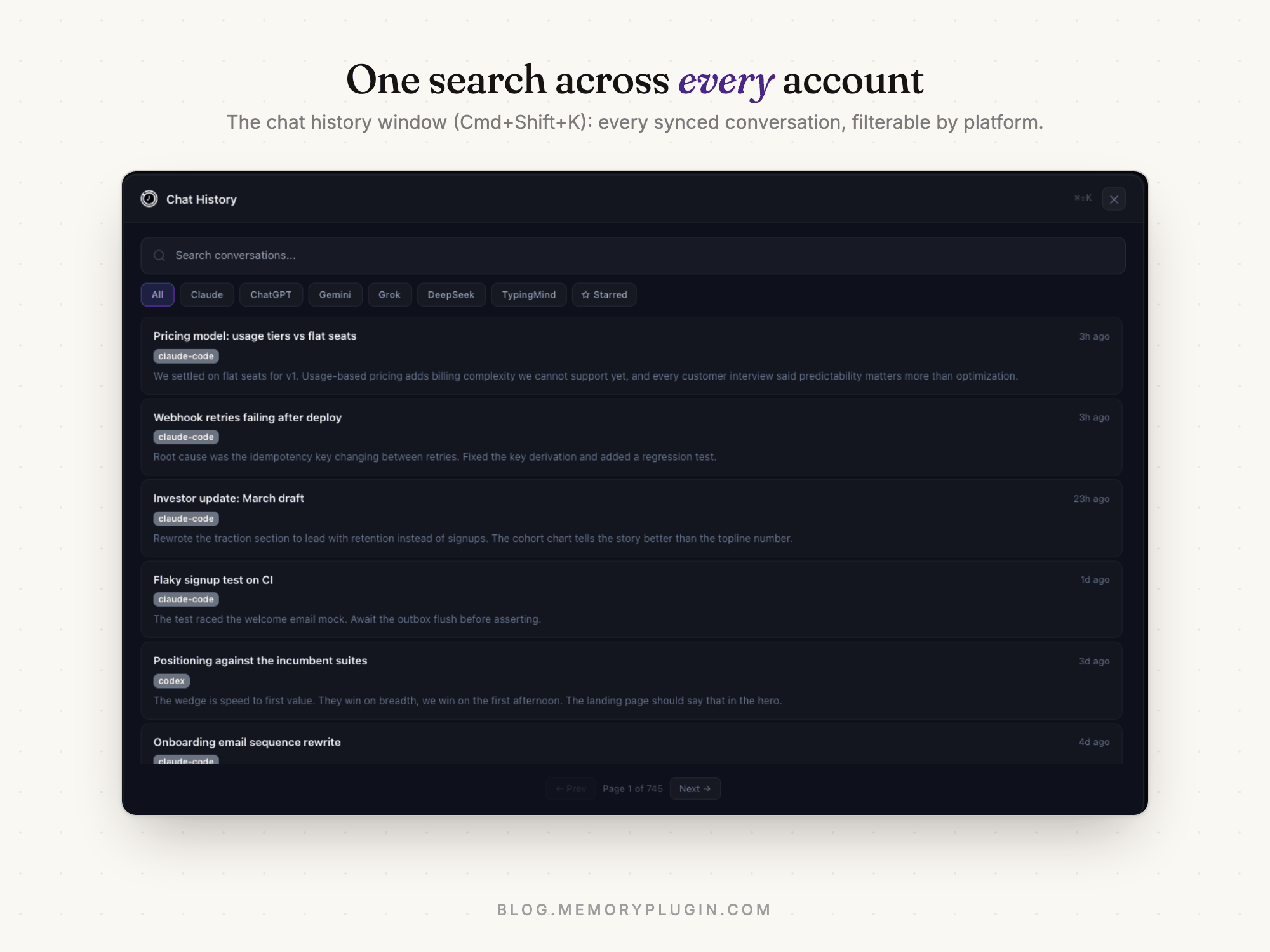
The extension saves my conversations to my MemoryPlugin account as I have them. When I am mid-chat in the Team account and need something from the before-times, I hit Cmd+Shift+K (Ctrl+Shift+K on Windows) and search my whole chat history at once. Which account a conversation came from stops mattering. My pre-switch chats are not stranded in the personal account; they are just history, findable from anywhere.
The desktop app, for the coding half of my life
A lot of my Claude usage is Claude Code, and those transcripts live on my machine, not in any web account. MemoryPlugin Sync pulls them into the same searchable history and gives me a system-wide search shortcut on my Mac. Personal sessions, work sessions, terminal sessions: one search box.
Recall, from inside whichever Claude I am in
Through the MCP server and agent skill, Claude itself can search my memories and past conversations. I can sit in the brand-new Team account and ask "what did I decide about the pricing model last spring?" and get a real answer, sourced from history that never touched that account. This is the part that still feels slightly illegal.
If you are about to make the same move
- Sync your history while the old account is still yours to open. The extension backfills existing chats, not just new ones: your old Claude conversations can be pulled into your searchable history straight from the recents page. The only real deadline is access, so do it before the personal account gathers dust.
- Bank the durable facts before you switch. I spent maybe twenty minutes making sure the important context was stored: active projects, standing decisions, preferences. That is why the new account felt familiar on day one.
- Do not take the migration by default. You can move content into a workspace later if you change your mind. You cannot ever move it back.
- Keep the personal account if you can. With a shared memory layer, two accounts are not two silos. They are two doors into the same context.
Frequently asked questions
Can I move my Claude chats back to a personal account after joining a Team?
No. Anthropic's migration is one-way: content moved into a Team or Enterprise workspace cannot be moved back to a personal account.
What transfers when I move my personal Claude account into a Team workspace?
Chats and artifacts, Projects with instructions and files, uploads, tasks, and memory and settings. Custom skills, public share links, and app authorizations do not transfer.
Can I use two Claude accounts at the same time?
Yes. Anthropic supports keeping a personal plan alongside a Team workspace. The accounts share nothing natively, so a cross-account memory layer like MemoryPlugin is what keeps them coherent.
Do I lose Claude's memory when I switch accounts?
Native memory is per account: your new account starts with whatever moved in the migration and builds from there. A memory layer in the browser carries the same context into both accounts, and into other AI tools.
How do I search my old Claude chats after switching accounts?
If MemoryPlugin saved them, press Cmd+Shift+K in the extension for instant search across your full chat history, or use the desktop app's system-wide search. Claude's own history stays siloed in the account that produced it.