

By Alara · Facts checked October 20, 2026
Short answer: Claude saves project memory as you chat, not once a day. If Claude memory is not updating, a setting is usually to blame: memory is paused or off, the chat started with memory off, or your Team or Enterprise owner hasn't enabled it. If your settings show Memory under Capabilities, you're on the older system, which updates within 24 hours.
That's from Anthropic's memory help article and release notes. If no setting explains it, you may have hit a bug.
Why isn't Claude's project memory updating?
- Memory is paused or off. The account switch is "Generate memory from chats" in Settings > Memory. Paused, Claude "won't use memory or make new memories," and chats from that time are never added later (help article).
- The chat started with memory off. Memory can be turned off per chat in the "+" menu, before the first message. A project chat started this way "doesn't use or add to the project's memory" (Projects help). Look for a crossed-out memory icon by the chat title (help article).
- Your organization hasn't enabled it. On Team and Enterprise, owners decide whether memory is available, and it stays off for each member until they turn it on. Organizations with HIPAA, public-sector or custom data retention agreements don't get memory at all (help article).
- The task ran in Cowork on your computer. Cowork sessions that run locally don't use memory (help article).
- Claude chose not to save it. Claude skips sensitive topics such as health or religion unless you opt in. It never saves things like government ID numbers, even if you ask (help article).
Example: You turn "Generate memory from chats" off so everyday chats aren't remembered. That pauses or resets memory for the whole account, so your projects stop remembering too. The only project-level switch Anthropic documents is "Use account memory," and it controls what a project shares, not whether it saves (Projects help).
Some failures were bugs, not settings. In August 2026, during the switch to the new memory system, a Pro user posted on r/ClaudeAI that project memories stopped updating and then vanished. In September, other users reported project memory disappearing from the project page for a few days. Anthropic hasn't commented on either thread.
How often does Claude update project memory?
On the current system, during the conversation. Since July 10, 2026, memory has been "a set of individual, categorized entries that Claude reads and updates during your conversations, replacing the previous daily memory summary."
The legacy system kept one summary for chats outside projects and a separate summary for each project, updated "within 24 hours" (help article). Anthropic says it has moved users off it, though the same page still has a section for "a small number of Team and Enterprise organizations" that use it.
| Current memory | Legacy memory | |
|---|---|---|
| Where the settings live | Settings > Memory | Settings > Capabilities |
| What it stores | Separate topics you can edit | One summary, plus one per project |
| When it updates | During the chat | Within 24 hours |
Example: If your settings show Memory under Capabilities, a day's delay is normal for you. If they show Settings > Memory, a day's delay means something is wrong.
How do I force Claude to update memory?
Tell it to. Inside the project, say "Remember that the launch moved to March 3." Anthropic says you can tell Claude to "remember this" to save something directly, and changes made from a chat apply to your next conversation (help article).
To fix something, tell Claude in the project what to change or forget. Settings > Memory lists everything Claude remembers under Topics, where you can edit or delete any entry (help article).
Example: Claude keeps calling your client by their old company name. In the project, say "Forget the old name, they're Northwind now." The next chat uses the new one.
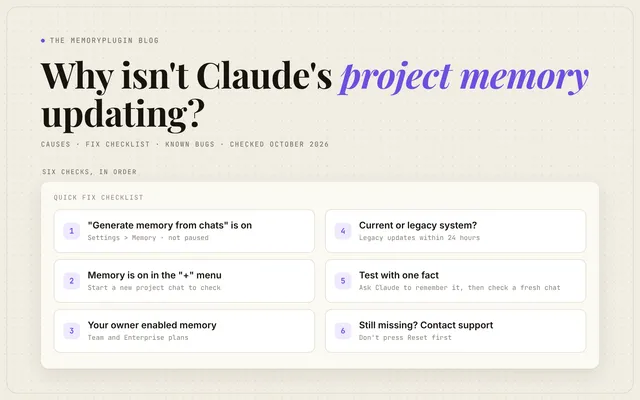
Quick fix checklist
- Open Settings > Memory and confirm "Generate memory from chats" is on, not paused.
- Start a new project chat and check the "+" menu shows Memory on. If Memory isn't in the menu at all, memory is off for your account or organization (help article).
- On Team or Enterprise, ask your owner whether memory is enabled for the organization.
- Check which system you're on: Settings > Memory (current) or Settings > Capabilities (legacy, 24-hour delay).
- Ask Claude in the project to remember one test fact, then open a fresh project chat and ask for it.
- If the fact is missing, contact Anthropic support. Don't press Reset first: it "permanently deletes all memories including project memories" (help article).
Does Claude project memory carry between projects?
No. Each project has its own memory, and Claude doesn't use memory from other projects. But a project isn't sealed off. Inside a project, Claude also uses your memory from chats outside projects, and new project memory can show up in those outside chats while memory is on (Projects help).
To keep a project fully separate, turn off "Use account memory" under Memory on the project's page. The same switch exists for Cowork projects.
Example: You tell Claude about a family trip in a normal chat. Your "Client work" project can see that too, until you turn "Use account memory" off.
Why is Claude Code project memory not updating?
Claude Code's Projects feature is a separate public beta, as of October 2026 only on Pro and Max (Claude Code docs). Its project memory is files with a MEMORY.md index that every cloud thread reads at the start, editable in Project settings > Memory. Two things stop updates:
- Threads on your own computer. A thread run from a local folder "starts with the project's instructions, but not with its memory files loaded" (Claude Code docs).
- Chat memory turned off. A user reported on GitHub issue #100597 that from October 8, 2026, project memory failed with "memory is turned off in the project owner's Claude memory settings." Turning chat memory back on fixed it. Anthropic hasn't confirmed this, and the docs don't mention it.
This memory is separate from Claude Code's local auto memory and your CLAUDE.md files. I cover that split in Does Claude Code Share Memory With Claude Chat?
A memory you can see and fix yourself
I built MemoryPlugin, so weigh this part with that in mind. Claude decides what to save, and you notice it stopped only when something goes missing.
MemoryPlugin keeps one memory outside Claude that you control. You add, edit and delete memories yourself, and sort them into buckets for work, personal and projects. It works with Claude through a browser extension or a remote MCP server, and the same memory works in other AI tools. Sync brings in your Claude Code, Codex and Cursor chats and makes them searchable.
Every subscription starts with a 7-day free trial. Set up MemoryPlugin for Claude.
FAQ
How do I see or change Claude's project memory?
Settings > Memory lists everything Claude remembers under Topics, where you can edit or delete an entry. You can also tell Claude inside the project what to remember, change or forget. The project page's Memory section holds the "Use account memory" switch. (help article, Projects help)
Does deleting a chat remove its project memory?
No. As of October 2026, memory entries made from a chat stay after the chat is deleted or expires. Delete the entry itself to remove it. (help article)
Can I use incognito chat in a Claude project?
No. Incognito works only outside projects. In a project, turn off Memory in the "+" menu before your first message instead. (incognito help)
Does resetting Claude's memory delete project memory?
Yes. Reset permanently deletes all memories, including project memories, and can't be undone. Pause keeps existing memory but stops new memory. (help article)
Is Claude memory available on the free plan?
Yes. Memory has been available to all Claude users, Free included, since March 2, 2026. It's on by default for Free, Pro and Max. (release notes, help article)