



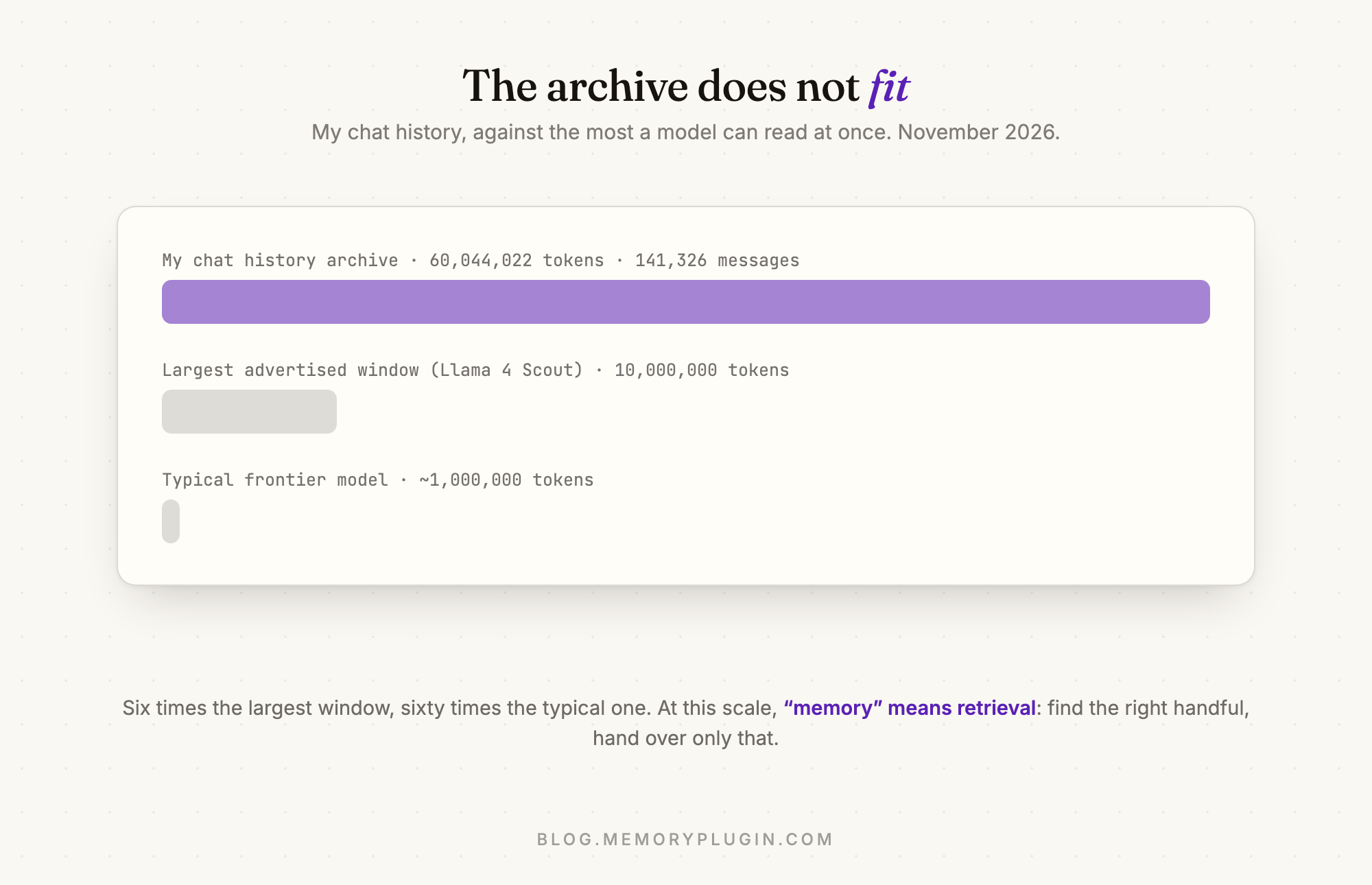
My chat history is six times bigger than the largest context window on any widely available model. Here's how the system that searches it actually works.
My MemoryPlugin account has about 60 million tokens of AI conversations stored in it. That's a little over four years of chats with ChatGPT, Claude, Gemini and others, all imported and indexed.
A token is the unit AI models read text in, roughly three quarters of a word. The amount a model can read in one go is called its context window, and for most frontier models today that's around a million tokens. The biggest one on a widely available model is Meta's Llama 4 Scout, at ten million. My archive doesn't fit in any of them, and even if it did, sending all of it with every message would be slow and very expensive.
So at this scale, AI memory means retrieval. You find the handful of past moments that matter for what's being asked, and give the model only those. And it has to happen in a few seconds for a couple of cents, because it runs on almost every message.
This post goes through how MemoryPlugin's chat history recall does that in production, one stage at a time, including the parts we got wrong. I'll explain the jargon as it comes up.
One constraint matters for everything below. MemoryPlugin has been sold at different prices over the years, and some early lifetime deals were a lot cheaper than what it costs today. Whatever a recall costs, I pay it, for every one of those users, for as long as they use the product. So speed, quality and cost all have to work at once.
Step one: cutting conversations into chunks
You can't search raw conversations directly. Some messages are three words long and some are three thousand. So the first step is chunking, which means cutting conversations into pieces of roughly similar size, a bit like copying an archive onto index cards. Everything after this works on the cards.
We got the chunk size wrong twice before getting it right.
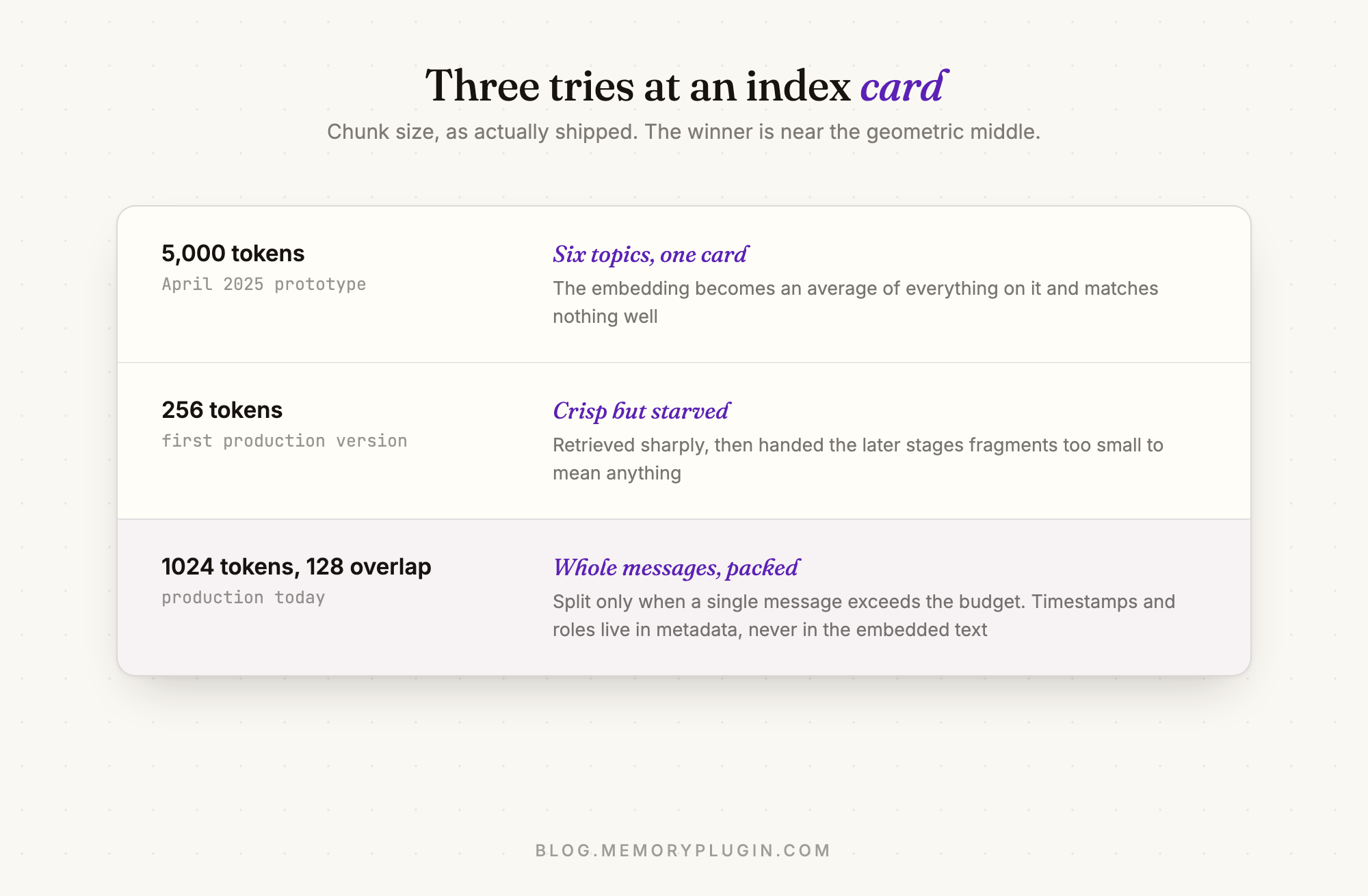
The first prototype, which I built over three days in April 2025, used chunks of 5,000 tokens. My thinking was that bigger chunks would carry more context. In practice, 5,000 tokens of conversation covers several different topics, and search sees the chunk as a blurry average of all of them, so it doesn't match any one question well. Imagine writing six diary entries on one index card and then trying to find the card about your dentist appointment.
The first production version went too far the other way, with 256-token chunks. Each one was about a single thing, so search found them easily, but they were too small to be useful once found. The later stages kept getting sentences without the conversation around them. We settled on about 1,000 tokens.
Two other decisions mattered more than the size. The chunker keeps whole messages together and only splits a message if it's too big for a chunk on its own, because a chunk that stops halfway through a sentence searches badly. And timestamps and speaker names stay out of the chunk text. Early versions started every chunk with something like "March 14, 2025, 3:12 PM, user:", which added nothing to its meaning and made search worse. That information now sits in separate fields next to the chunk, where search filters can still use it.
Step two: two kinds of search
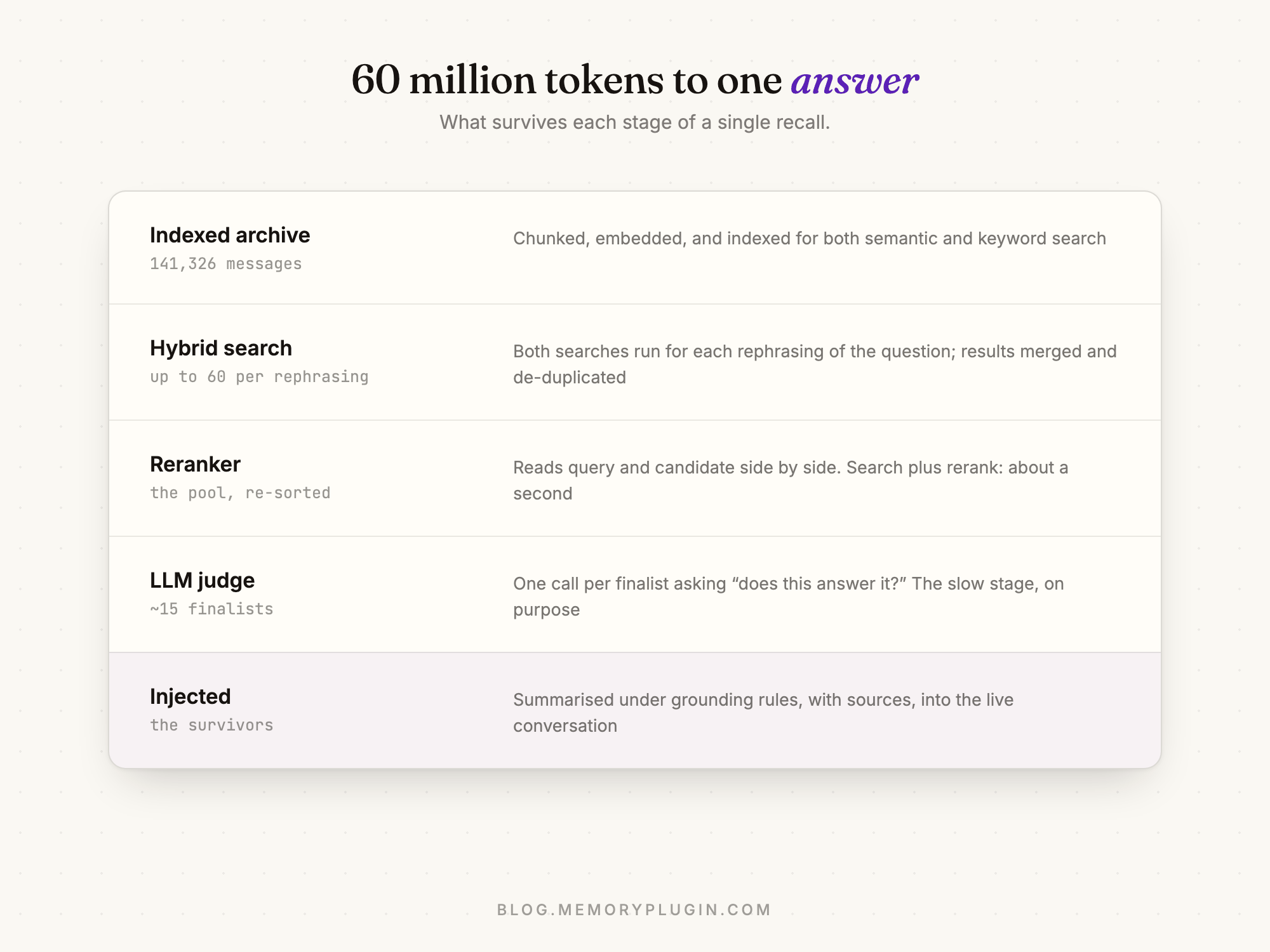
Before searching, a small, fast model rewrites the question a few different ways, so a vaguely worded question gets several chances to match. Then for each version we run two different searches at the same time, because each one is bad at something the other is good at.
The first is semantic search, which uses embeddings. An embedding is a list of numbers that a model assigns to a piece of text, like coordinates on a map, where texts with similar meanings end up close together. "My dog was sick last spring" and "the vet visit in April" share no words, but they land near each other on that map. We create our embeddings with Voyage AI's models and store them in Milvus (hosted for us by Zilliz Cloud), a vector database. A vector database is built to answer one question quickly: which stored items are closest to this point? Milvus has done that job since the first prototype.
The second is keyword search, using an algorithm called BM25. It's a smarter version of ctrl-F that scores chunks by how many of your words they contain, with rare words counting for more than common ones.
We need both because semantic search struggles with exactly what keyword search handles well. Names, product names and things like "error 1010" don't have meaningful neighbours on the meaning map, so semantic search often misses them. Keyword search finds them instantly but misses anything phrased differently. Running both covers each one's gaps.
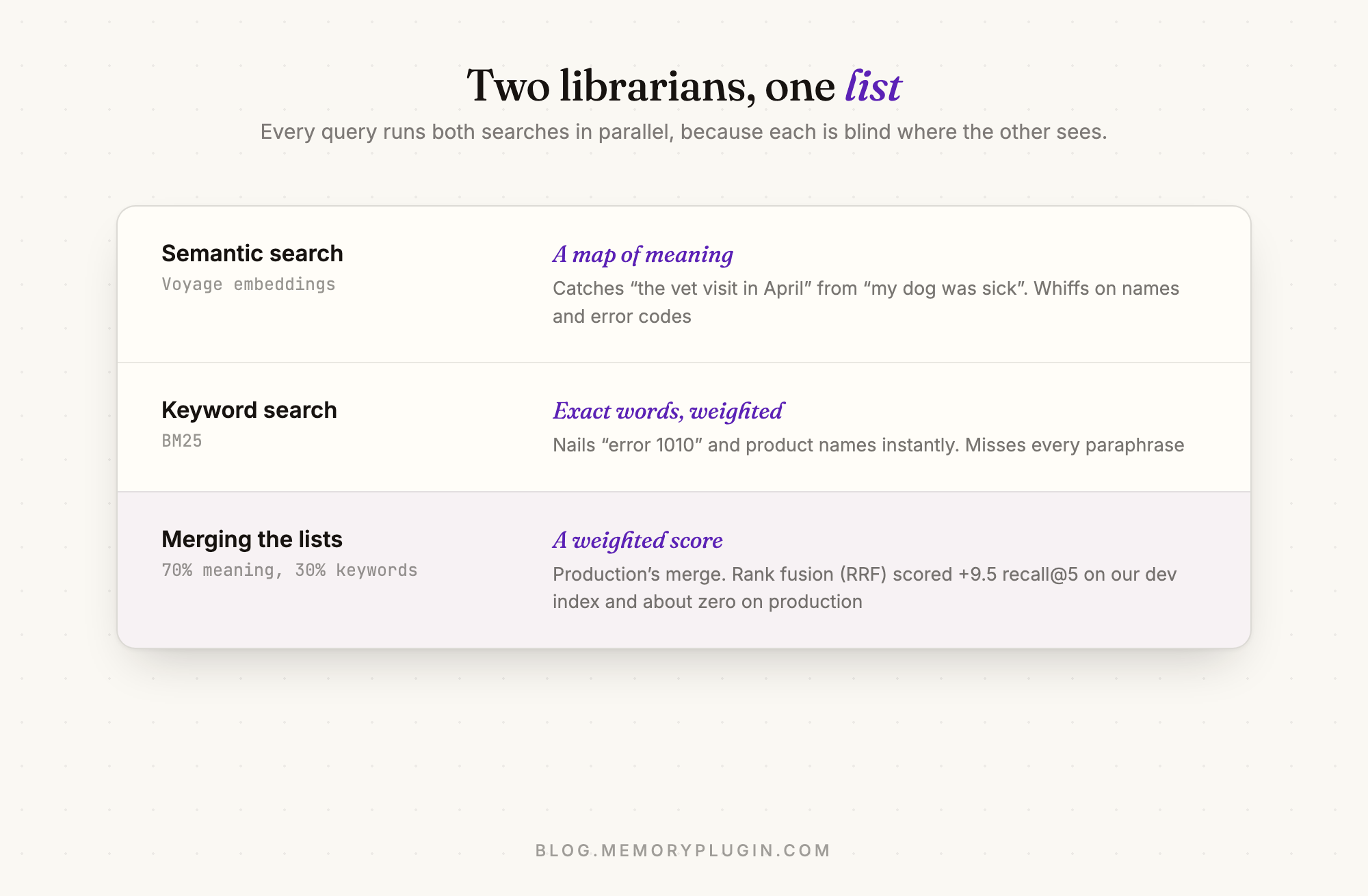
The two result lists then get combined into one. Production uses a weighted score, where a chunk's semantic score counts for 70% and its keyword score for 30%. Each rewritten question brings back up to 60 chunks this way, and the results get pooled and de-duplicated.
There's a well-known alternative called reciprocal rank fusion, or RRF. It ignores the scores completely and gives each chunk points based on where it ranks in each list. A chunk that comes 4th in one list and 6th in the other beats one that comes 1st in one list and doesn't appear in the other, which usually makes sense, since showing up in both is better evidence. That looks like a clear improvement over a weighting we picked by hand, so we tested it. I'll come back to what happened after explaining how we measure things.
How we measure any of this
We have a golden set of about 300 real questions about my own archive. Some I wrote by hand and some were generated, and each one is labelled with the conversations a correct answer has to come from. We run the whole set through the pipeline and compare what comes back against the labels. That turns "this feels better" into a number we can compare.
The main score is recall@5: the share of questions where at least one correct chunk shows up in the top five results. Later stages can only work with what search finds, so this is the one we watch most. We also track nDCG, which scores from 0 to 1 how high up the list the right results are.
Scoring search results is cheap. Scoring the final answers isn't, because it means having other models read every answer and check it against the sources, and a full run like that can cost over $100. We use promptfoo, an open source tool, for smaller prompt tests, and save the expensive full runs for changes that need them.
Step three: the reranker, and experiments that gave the wrong answers
The pool of chunks from search is only roughly ordered. Embeddings are created long before anyone asks a question, so the embedding model never sees the question and the chunk together. A reranker does. It's a model (we use Voyage's) that reads the question and each chunk side by side and scores how well they actually match. It's slower per chunk but much more accurate, so search looks through everything cheaply and the reranker carefully sorts the shortlist. It's like a recruiter filtering CVs by keyword first and then actually reading the ones that made it through. When we tried removing it in a test, recall@5 dropped by about 15 points.
In June and July 2026 we ran our first round of experiments and got three results. Fetching 200 candidates per search instead of 60 helped. Switching to RRF helped. And upgrading from Voyage's small reranker, rerank-2.5-lite, to the full rerank-2.5 made results worse. That last one seemed to show that a bigger model isn't always better, so we kept the small one.
All three results turned out to be wrong.
Start with the reranker. When we reran the experiment more carefully, we checked what each stage recorded it had actually done, rather than what we'd told it to do. Every single run had used rerank-2.5-lite. The setting that was meant to switch to the bigger model never reached the code that calls Voyage, and the system quietly fell back to the default. Both sides of the experiment ran the same model, and the difference we measured was noise.
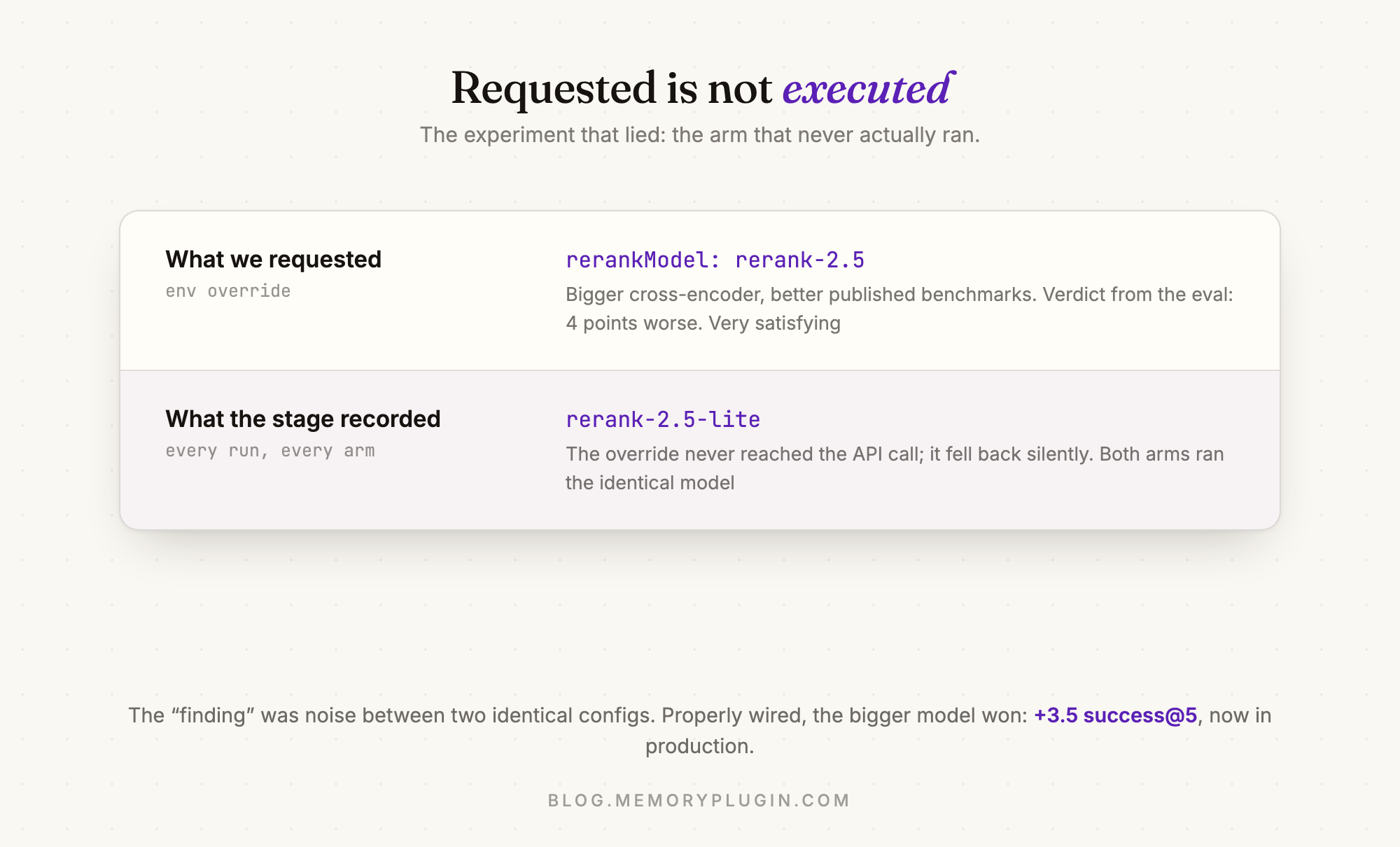
Our test harness now logs the settings each stage actually used for every result, next to the settings we asked for. Before a full run, it also runs three test questions for each version being compared and stops if anything doesn't match.
The rerun also found a second problem, which explains the other two results. Remember the model that rewrites each question before searching? It doesn't give the same output every time. In the first round, most of our test questions got different rewrites in different versions of the experiment, so the versions weren't really running the same searches. We fixed that by generating the rewrites once, saving them, and giving every version the same ones.
With both problems fixed, every result changed.
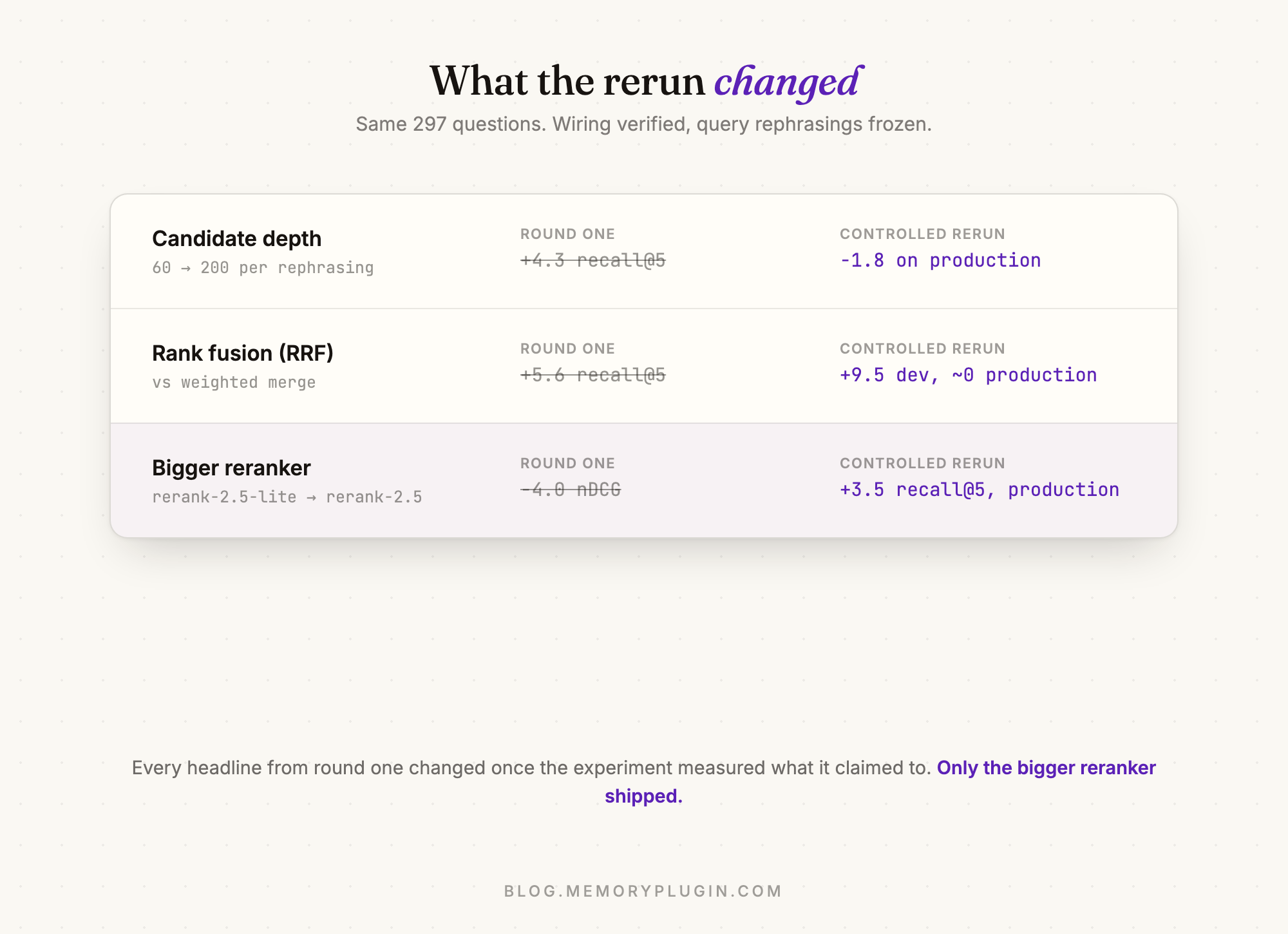
The bigger reranker was better after all, and it's what production runs today. Fetching 200 candidates instead of 60 made production results slightly worse, so we stayed at 60. RRF was the most interesting one. On our development index, a separate index we test against, it was a big improvement. On production it made almost no difference, because production search was already finding the right chunks for most questions, so a better merge had very little left to fix. Production kept the weighted merge.
Step four: the judge
I timed five recalls in production this month. Embedding the question, searching 60 million tokens and reranking took about a second in total. The slowest step, around half of each recall, comes after search: a model reads each remaining chunk and decides whether it actually answers the question, before anything gets passed on.
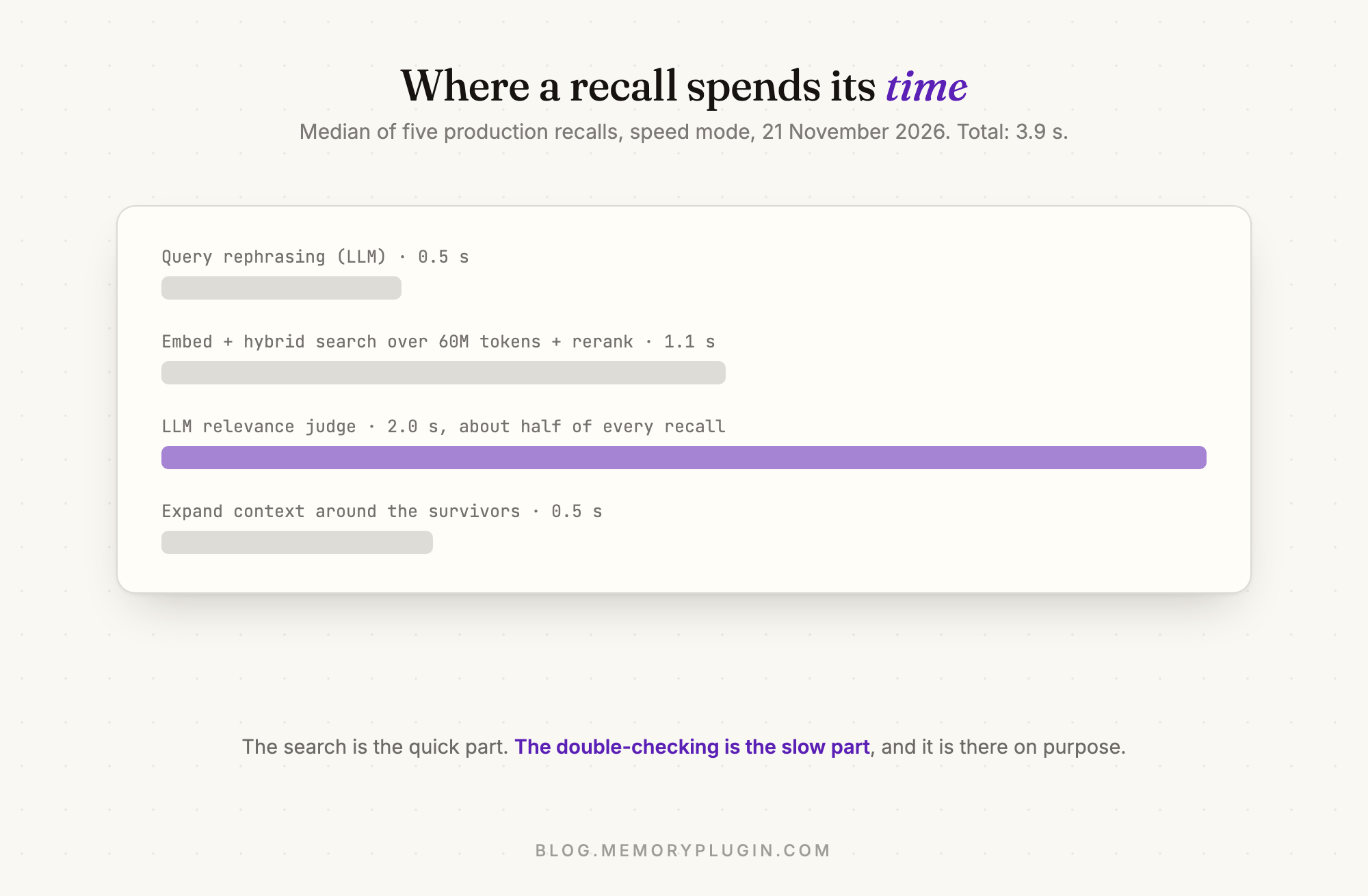
We could skip this step, and recalls would take roughly half the time. Plenty of products skip it, and it looks fine in a demo. We keep it because a ranked list always has something at the top, whether or not anything relevant exists. Search only tells you a chunk is similar, and in 60 million tokens of history there's always something similar. Pass the top results along without checking, and the AI you're talking to repeats them back with full confidence, mixed into its answer to whatever you actually asked. (In Labs 001, that kind of confident mixing ended with a model telling me about a dog I've never had.) The judge's job is to say no to those chunks.
The judge is a model following a prompt, so we test prompt changes the same way we test everything else. The best change we've made was adding a short set of grounding rules:
- Every statement in SUMMARY must be directly supported by text
  inside the source excerpt. If you cannot point to the words that
  support a claim, do not write the claim.
- Never fill gaps with plausible details. If a date, number, or
  decision is not in the excerpt, it does not go in the summary.
- If the excerpt only partially covers the query, summarize what it
  covers and stop.
That cut the share of answers containing claims the source didn't support from 48% to 30%, and it made the step faster too. To get those numbers, other models checked every claim in every answer against the source conversation. Before trusting them, I graded a sample myself without knowing which version had produced which answer, to make sure their judgement matched mine.
The same tests stopped me shipping a mistake. I wanted to combine every prompt change that looked promising into one prompt, and that combined version scored worst of everything we tried.
We also rarely change the judge's model. Even with the same prompt, a different model behaves differently. It might write longer summaries or be stricter about what counts as relevant, so every swap means rerunning the full test set. When we changed the model for quality mode in October, we compared four candidates first, and Gemini 3.5 Flash Lite won. A model that scores slightly better on a benchmark the week it comes out isn't worth that work, and users notice when behaviour shifts under them.
Step five: the bug the dashboards didn't show
Some problems only show up in production. This one showed up as Sentry emailing me error alerts until I looked into it.
The judge step makes one model call per chunk, all in parallel, which at the time meant about 15 calls per recall. Each call succeeded about 95% of the time, which sounds fine. But a recall needed all of its calls to succeed, and the chance of 15 calls all succeeding at 95% each is under 50%. So every individual call looked healthy on the dashboard while about half of all recalls failed or got stuck. It's like a group photo where each person blinks in one shot out of twenty: with fifteen people in the frame, most photos have someone blinking.
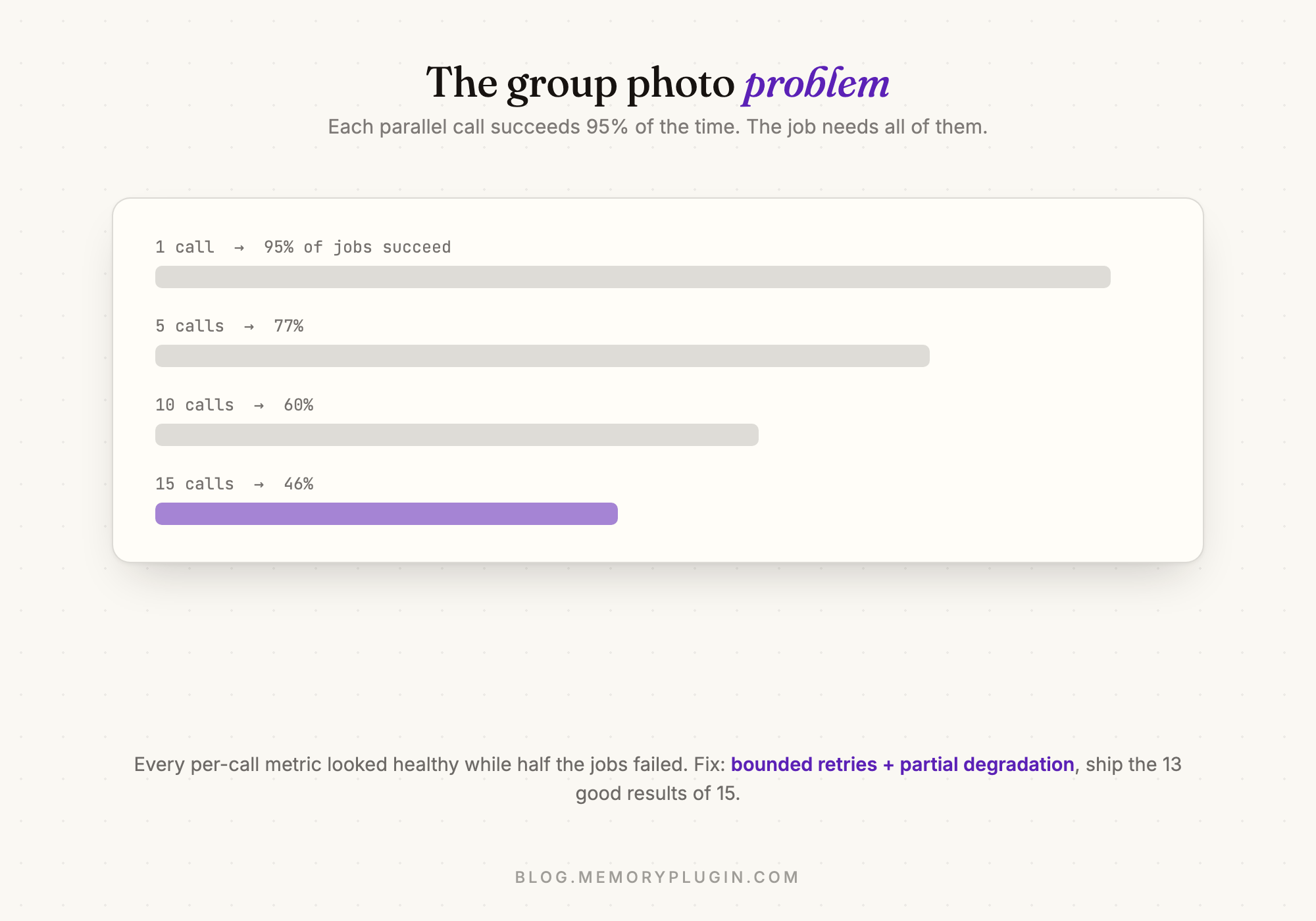
The fix was simple. Each call now retries a few times with a short wait in between, and if a couple still fail, the recall returns the results it has instead of an error.
The other production issue was tail latency, which people usually measure as P95: how long your slowest 5% of requests take, or what your unluckiest users experience. Averages hide it. We send some of our model calls through OpenRouter, a service that routes requests to many different hosting providers. DeepSeek V4 Flash, which writes our conversation summaries, goes through it, partly for privacy. We only allow providers that don't store or train on request data, and every request enforces that with data_collection: "deny". What I hadn't realised is that by default OpenRouter spreads requests across all the allowed providers, and some of them were very slow. One summary job took nine minutes. Adding sort: "throughput", which sends requests to the fastest allowed provider, fixed it.
Step six: speed mode and quality mode
Recall has two modes. Speed mode is the default and is the pipeline described above, with the judge step running on gpt-oss-120b on Groq. It usually takes 3 to 5 seconds. Quality mode plans the search first, looks at the question from several angles, and then judges candidates in batches with a second model, currently Gemini 3.5 Flash Lite. It takes longer, somewhere between 6 and 35 seconds when I tested it. Speed is the default because recall happens in the middle of a conversation, and most of the time people don't want to wait. Quality mode is for the questions where a better answer is worth the wait.
The cost side changed a lot while this post was in drafts. In June, speed mode actually cost more per query than quality mode. Quality mode then ran on DeepSeek V4 Flash, a slow and cheap model, and could take up to a minute, so you paid for speed mode in money and for quality mode in waiting. We've rebuilt quality mode since. It's much faster now, and it costs about five times as much per query as speed mode.
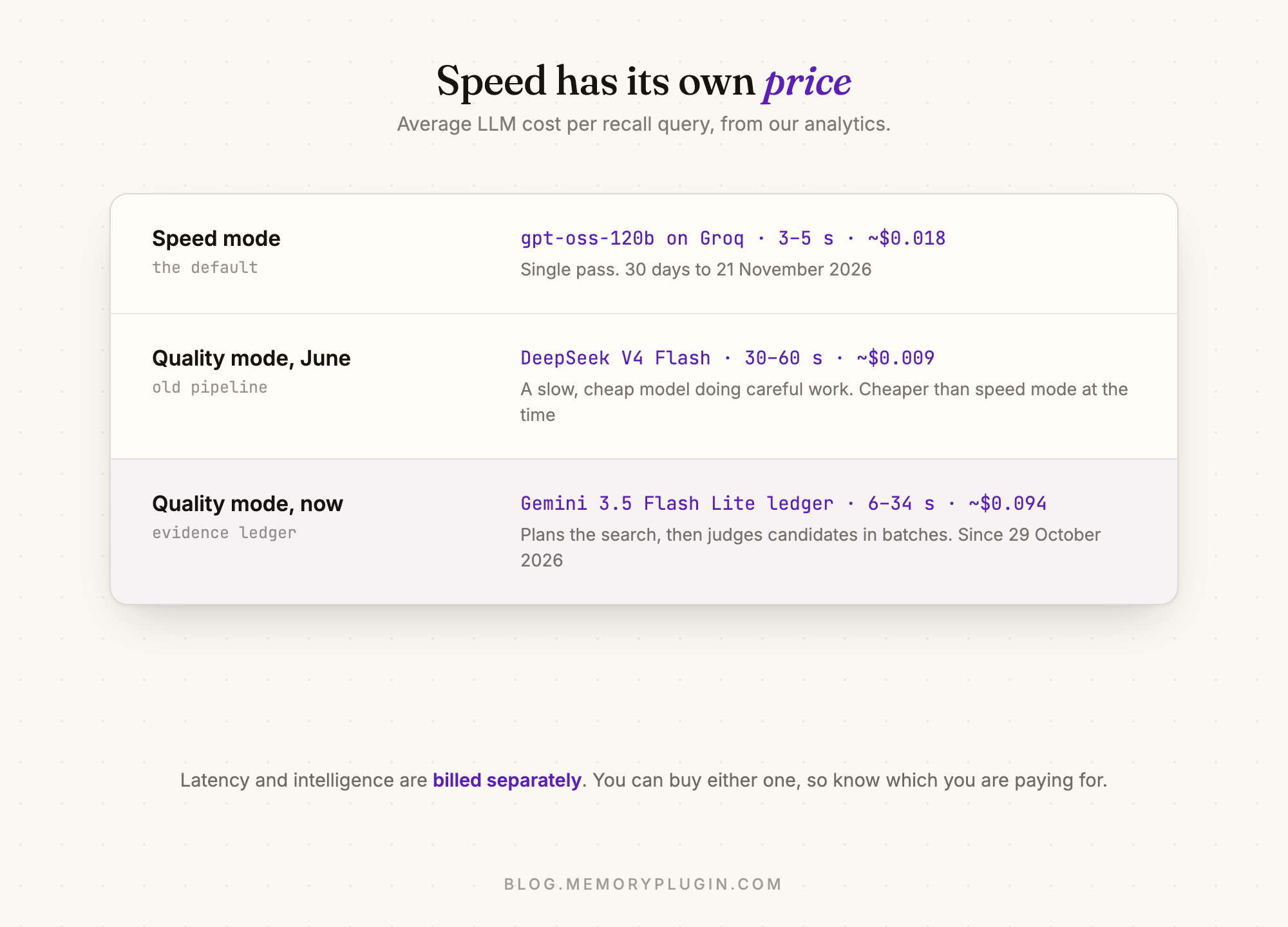
Speed and intelligence get paid for separately. In speed mode, most of what we pay for is Groq's hardware, which is what makes it fast. Quality mode gets careful answers quickly by making more model calls. Nine cents a query is fine for a mode people pick when they have a hard question. It wouldn't be fine as the default, because of those lifetime deals: a default recall at ten cents, paid by me forever, isn't sustainable.
What still bugs me
Quality mode is much faster than it was in the summer, but it's still slower than I'd like on hard questions, and my slowest test took 34 seconds. Most ways of making it smarter add another step, and every step adds time or cost.
Imports are a constant chase. Each platform controls its own export format and changes it without warning. ChatGPT's export is a nested tree that takes real work to parse, and this summer Claude's export moved to a new batched format, with memory arriving as a folder of markdown files. We added support within days of noticing, but noticing usually means a user telling us their import failed.
And the archive keeps growing. Mine went from 52 to 60 million tokens while this post was in drafts, and the more there is, the more the judge has to read.
Key takeaways
- At this scale, AI memory means retrieval. My archive is six times the largest available context window, and sending it all with every message would cost far too much anyway.
- Build a test set before you tune anything, and don't trust its first results. All three of our first-round findings changed once the experiments ran properly.
- Log what each stage actually did. Our most confident result came from a setting that never reached the API.
- Checking search results with a model before using them costs us about half our latency, and it's worth it, because a ranked list always has something at the top.
- Do the maths on parallel calls. If each call succeeds 95% of the time, fifteen of them together succeed less than half the time. Retries and returning partial results fix most of it.
- Track what speed costs and what quality costs separately. For us, which mode was more expensive flipped within a few months.
Common questions
How does AI memory recall work at scale?
It works by retrieval rather than reading everything. The archive is split into chunks of about 1,000 tokens, each indexed for both semantic and keyword search. A question gets rewritten a few ways, both searches run for each version, the results are merged and reranked, and a model checks which of the top results are actually relevant before anything is used. In our system, search and reranking take about a second, and most of the time goes to that final check.
What chunk size is best for RAG?
We tried 5,000-token chunks, then 256, and settled on about 1,000. Very large chunks mix several topics into one embedding, and very small ones lose the context around them. Two other choices mattered more than the size: never splitting a message in the middle, and keeping timestamps and speaker names out of the text you embed.
Why is my RAG pipeline slow?
Usually it isn't the vector search, which for us takes about a second together with reranking. Check your model calls first, especially if you run many in parallel, since that makes both slowdowns and failures more likely. Also check how requests are routed: if a service spreads them across providers, your slowest requests will be as slow as the slowest provider.
How do you evaluate a RAG pipeline?
Build a set of real questions, each labelled with where the right answer comes from, and measure how often the right source shows up in the top results (recall@k) and how high it ranks (nDCG). To judge the final answers, have a model check each claim against the sources, and compare its judgements with your own on a sample first. During experiments, log what each stage actually did and keep anything random fixed between runs. Our first-round results changed once we did both.
This is MemoryPlugin Labs, where I write about the engineering and experiments behind the product. Labs 001 covered my attempt to fine-tune my memories into a model's weights.